ServiceNow Change Task Assignment Group Routing, Change Request Assignment Group, and Auto Create Change Task Rules
A change request gets approved, the implementation window opens, and the change tasks it created sit in a list with an empty Assignment group. Nobody is paged, nobody claims them, and the change manager finds out when the window closes. On a default instance that is not a misconfiguration. It is how the out of box flow behaves.
In short
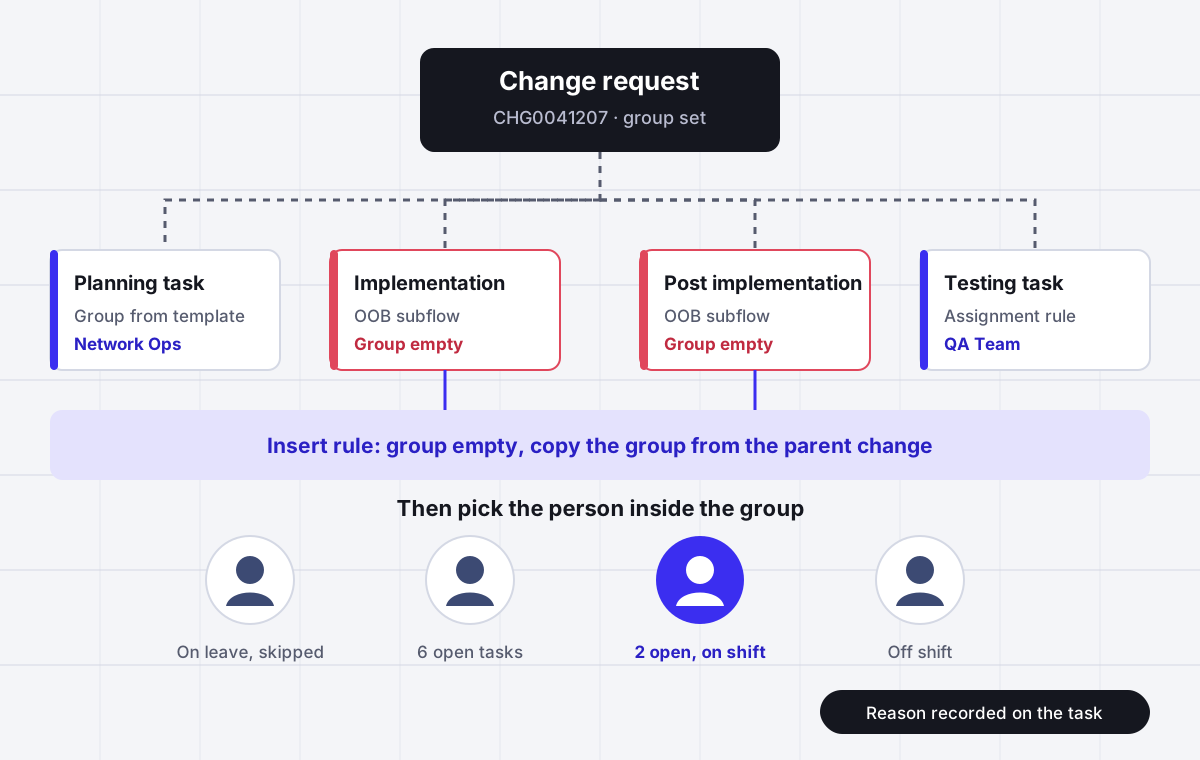
A ServiceNow change task (table change_task, numbered CTASK) has its own Assignment group field, separate from the change request above it, and nothing copies one to the other by default. The out of box Change - Normal - Implement flow calls a subflow named Change - Implementation tasks that creates the Implementation and Post Implementation tasks with no assignment group at all, and that subflow is ServiceNow owned, so you cannot simply edit it. The fix most admins use is a business rule or flow on change_task insert that sets the group from the parent change when the field is empty. Assignment rules also work on change_task, but only while both Assignment group and Assigned to are empty, and only the matching rule with the lowest order runs. Standard changes get their task groups from change task templates. None of these pick the person inside the group.
Why it fits
This page is for a ServiceNow change manager, ITSM admin or infrastructure lead whose change tasks arrive without a team, stay in a group queue during the implementation window, or pile up on the one engineer who always picks them first.
The OOB implementation tasks arrive with no group
The Change - Implementation tasks subflow creates the Implementation and Post Implementation tasks in parallel and sets no Assignment group. Admins report that they cannot add one because the subflow is protected, so the tasks land unowned on every normal change until someone builds a rule around it.
The parent group does not flow down
Change request and change task each carry their own Assignment group. Setting or changing the group on the change does nothing to the tasks already created under it. Inheritance, and reassignment when the parent moves, both need a business rule or flow you write and maintain.
Assignment rules only fill an empty field
An assignment rule on change_task fires only when Assignment group and Assigned to are both empty and the record has been saved. If a flow, template or script set any group first, your rule is skipped, and nothing logs that it was skipped.
Templates can store a group the form would hide
The Assignment group picker on the change form applies a reference qualifier that typically limits it to ITIL groups. The picker on a standard change template has no such qualifier, so a template can save a group that no fulfiller could choose by hand.
Location means one template per team
Standard change task templates hold one fixed group each. A standard change that ten regional teams perform needs ten nearly identical templates, or a script that swaps the group afterwards, because the template has no way to pick a team by location.
A group is not an owner
Every native method stops at Assignment group. Assigned to stays empty until someone in the group claims the task, so the fastest clicker takes the easy tasks and the person with the most room for work is not the one who gets it.
Side by side
Every native way a ServiceNow change task gets an assignment group, and where each one leaks
| Method | What it sets | When it runs | Leaks when | Picks a person |
|---|---|---|---|---|
| OOB Change - Implementation tasks subflow | Implementation and Post Implementation tasks, with no Assignment group | When the normal change reaches Implement | Always, until a rule fills the group | No |
| Business rule or flow on change_task insert | Assignment group copied from the parent change when empty | On insert of each change task | The parent has no group yet, or the parent group is changed later | No |
| Assignment rule on change_task | Assignment group, or Assigned to, from conditions | On save, only when both fields are empty | Anything set a group first, or a lower order rule matched | Only a fixed user |
| Standard change task template | Task fields including group, one template per task | When the standard change request is created | The work depends on location or site, or the template group has no members | No |
| Change Task template applied by hand | Prefilled fields on a new task | When a fulfiller applies it | Someone forgets to apply it | No |
| Copy Change UI action | Tasks copied with the fields listed in a system property | When a change is copied | Task groups are not in the copy property, so the change group is applied instead | No |
| List edit in bulk | Group and assignee on many tasks at once | When a person does it | Assigned to must be a member of the group on some forms | Yes, manually |
Sources: ServiceNow documentation for creating change tasks and standard change task templates, and accepted answers in the ServiceNow Community ITSM and developer forums. Property names are the ones cited in those threads. Behavior can differ on instances where flows or business rules have been customized.
In detail
How change task assignment really works in ServiceNow, and what admins end up building
Why ServiceNow change tasks have no assignment group
Open any recent normal change on a default instance and look at the two tasks created when it moved to Implement. The Implementation task and the Post Implementation task both show an empty Assignment group. That comes from the design of the out of box flows, not from a broken rule. The Change - Normal - Implement flow calls a subflow named Change - Implementation tasks, which creates both tasks in parallel and sets their short description and parent, but no group.
An admin who asked in the ServiceNow Community ITSM forum put it plainly: the implementation change tasks have no assignment group and the team was unable to add one to the subflow. The subflow is owned by ServiceNow and protected, so the obvious edit is not available. The two options on the table were to copy the subflow, add the group, and repoint every change flow at the copy, or to leave the subflow alone. The accepted answer, from a Mega Sage, took the second route: create a business rule or flow triggered when a change task is inserted, with the condition that Assignment group is empty, and set the group to the one on the related change request.
That answer is the right default for most instances because it survives upgrades. Copying a protected subflow means your copy stops receiving ServiceNow fixes to the original, and every change model that points at the old subflow has to be found and switched.
How to set the change task assignment group from the change request
The rule itself is short. On the change_task table, after or before insert, condition Assignment group is empty, set current.assignment_group to current.change_request.assignment_group. In Flow Designer the same thing is a record triggered flow on Change Task created, with an Update Record action. Either works. The decisions that matter are around it.
First, decide what happens when the parent has no group either. A change raised from a catalog item or an integration may not have one yet when its tasks are created, and the rule will copy an empty value. Add a fallback group, usually the change management group, so nothing is created unowned.
Second, decide what happens when the parent group changes later. ServiceNow does not cascade it. The pattern Chuck Tomasi gave for requested items applies to change requests as well: an after business rule on the parent, condition Assignment group changes, that walks the active child tasks and updates theirs. Be careful with this one. It will also overwrite tasks you deliberately gave to a different team, such as a network task under a server change, so limit it to tasks whose group still equals the old parent group.
Third, remember the rule sets a team, not a person. The tasks still sit in the group queue until somebody claims them.
ServiceNow change task assignment rules and why they get skipped
Assignment rules under System Policy, Rules, Assignment apply to any table that extends task, and change_task is one of them, so you can route change tasks by category, configuration item, change type or task type. Three limits decide whether they ever fire.
They run only when both Assignment group and Assigned to are empty. A template, a flow action or the insert business rule above that sets a group first takes the record out of reach of every assignment rule, permanently. They do not run on unsaved form changes, so a fulfiller who edits a field and looks for the group to appear before saving will not see it. And when more than one rule matches, only the one with the lowest order value runs. Two rules written by two admins for overlapping conditions produce routing that depends on a number nobody remembers setting.
So pick one owner for the first write. Either the insert rule copies the parent group and assignment rules are reserved for tasks with no parent group, or assignment rules make every decision and the insert rule only fills gaps. Mixing them is where most unexplained change task routing comes from.
Standard change task templates and the one group per template problem
Standard changes are the one place ServiceNow does create tasks with a group already on them. On a standard change proposal in the New state you open the Change Task Templates tab, select New, and fill the task values, including Assignment group. The documentation is specific about timing: you can add standard change tasks only while the proposal is in New, and after you submit it for approval you cannot add more. When the standard change request is later created from the template, the related change tasks are created with it.
The catch is that each template stores a fixed group. A Community thread describes the common case exactly: one standard change that any of ten teams could perform, ideally chosen by location, and no way to do it without ten nearly identical templates. Fulfillers in that instance could not edit the populated fields either. The usual workarounds are a business rule that swaps the group based on the location of the configuration item after the tasks are created, or assigning the whole change to a coordinating team that creates its own tasks.
Two smaller traps sit next to it. The default assignment group for the Standard Change Proposal record itself comes from an assignment rule on that table, and the out of box approval workflow sends proposals to the Change Management group regardless of the group you pick, so changing one does not change the other. And the Assignment group picker on the template has no reference qualifier, while the one on the change form usually shows only ITIL groups, so a template can save a group that fulfillers could never select by hand. When that group has no active members, every task from that template lands in an empty queue.
Auto create change tasks with a group from a change model or flow
A change model on its own does not predefine change tasks. What it does is point at flows, and the flows create tasks. So auto creating change tasks means adding Create Record or Create Task actions to the flow the model uses, or to a subflow it calls, and setting Assignment group on each action. Two community answers agree on this: one says change models cannot predefine tasks but Flow Designer can create them on conditions, the other that the change model uses Flow Designer and the tasks are defined in the flow.
If you build tasks in a flow, set the group by lookup, for example from the configuration item support group or a decision table, rather than pasting a group sys_id into the action. A pasted sys_id is instance specific and resolves to nothing after the update set moves, which is the same failure admins meet on catalog tasks. Also keep implementation task dates in mind: the planned start and end of an implementation task must fall inside the planned window of the change request, so a flow that creates tasks with default dates can fail validation.
Copied changes and bulk reassignment
The Copy Change UI action copies tasks according to system properties. The ones cited in the Community are com.snc.change_request.copy.attribute for the change fields, com.snc.change_request.copy.related_lists for which related lists come across, and com.snc.change_request.copy.rl.change_task.attributes for which change task fields are copied. If assignment group is missing from that last list, copied tasks lose their original groups, and an insert rule like the one above will then stamp the parent group on all of them. That is exactly the report in one thread: after copying a change, every task carried the change group instead of its own.
For moving many tasks by hand, list editing works: select the Assignment group cells, double click, set the value. The constraint to remember is that on many forms Assigned to must be a member of the selected Assignment group, so a bulk update that sets a person outside the group fails. Once a change task is submitted or closed it cannot go back to Open or In Progress, so reassignment has to happen before work is recorded against it.
Where Assigner fits beside ServiceNow change management, and where it does not
If one infrastructure team implements almost every change, your change tasks already get the right group from a single insert rule, and the team lead hands out work in the CAB meeting, you probably do not need anything else. Build the rule, add a fallback group, schedule a report of change tasks with an empty group that are in an open state, and move on.
The boundary is the second decision. ServiceNow decides which team owns a change task, and then stops. Who inside the team gets it is left to whoever claims it first, which during a busy weekend window means the most responsive engineer collects the work and the one with capacity sits idle. Assigner picks the person. It takes each change task after ServiceNow has set the group and assigns it by rotation, current open load, skills such as network, database or storage, and availability, so an engineer on leave or off shift is skipped. Every assignment records the rule and the reason, which is what a change manager needs when a post implementation review asks why a task went to someone who was not in the window. It also removes the one template per team problem, because the rule can choose the team by site or configuration item before choosing the person, without ten copies of the same standard change.
Assigner sits beside ServiceNow rather than replacing it. Change records, approvals, CAB and the change calendar stay in ServiceNow. Plans start at $12 per user per month billed yearly, or $15 billed monthly, and you can try the routing studio at the top of this page on your own groups before you create an account.
Questions buyers ask
Frequently asked questions
Why does my ServiceNow change task have no assignment group?
On a default instance the Change - Implementation tasks subflow, called by the normal change Implement flow, creates the Implementation and Post Implementation tasks without an assignment group. The subflow is ServiceNow owned, so the usual fix is a business rule or flow on change_task insert that copies the group from the parent change when the field is empty.
Does a change task inherit the assignment group from the change request?
Not by default. The change request and each change task have separate Assignment group fields and nothing copies one to the other. You add inheritance with an insert business rule or flow, and cascading later changes from the parent needs a second after rule on the change request.
How do I auto assign change tasks in ServiceNow?
Use an insert business rule or flow that sets the group from the parent change, assignment rules on the change_task table for condition based routing, or Create Record actions in the flow your change model uses with the group set by lookup. All three set a group. Picking the individual engineer needs a round robin or load based step on top.
Do assignment rules work on change tasks?
Yes. Assignment rules apply to tables that extend task, including change_task. They fire only when Assignment group and Assigned to are both empty and the record is saved, and when several rules match only the one with the lowest order runs.
How do I auto create change tasks in ServiceNow?
Add task creation actions to the flow your change model runs, or to a subflow it calls, and set the assignment group on each one. For standard changes, add change task templates to the standard change proposal while it is in the New state, and the tasks are created with each standard change request.
How do I add a change task template to a standard change?
Open the standard change proposal while it is in the New state, select the Change Task Templates tab, select New, and fill in the name, order, short description and change task values including the assignment group. After the proposal is submitted for approval you cannot add more tasks.
Why can I pick a group on the template that I cannot pick on the change form?
The Assignment group reference on the change form usually carries a qualifier that limits it to ITIL groups, while the reference on a standard change template has none. A template can therefore store a group that fulfillers cannot select by hand, and if it has no members the tasks land in an empty queue.
How do I change the assignment group on multiple change tasks at once?
Filter the change task list, select the Assignment group cells, double click the first selected cell, enter the group and confirm. On many forms Assigned to must be a member of the selected group, so set the group first and the person second.
What change task types does ServiceNow have?
The change task form offers Planning, Implementation, Testing and Review types. The planned start and end of an Implementation task must fall inside the planned start and end of the change request.
Why do copied changes put the wrong group on the tasks?
The Copy Change action copies task fields listed in com.snc.change_request.copy.rl.change_task.attributes. If assignment group is not in that property, the copied tasks lose their groups, and any insert rule that fills empty groups will stamp the parent change group on all of them.
Can ServiceNow round robin change tasks within a group?
Not with assignment rules or change task templates, which set a fixed group or user. Advanced Work Assignment can distribute work items from queues, but it is licensed and configured separately and change tasks are not its default use. Most teams either let engineers claim tasks or add a routing layer that picks the person.
What does change task routing software cost?
Assigner is $12 per user per month billed yearly, or $15 billed monthly, and runs beside ServiceNow without changing your change process. You count the engineers who receive assignments, not every requester.
Keep reading
Related ServiceNow routing pages worth reading next:
- ServiceNow catalog task assignment - The same empty group problem on SCTASK records, and why the Fulfillment group field routes nothing.
- ServiceNow assignment rules - Order, conditions and the empty field rule behind every skipped assignment.
- ServiceNow assignment group - How groups, members and types decide who can receive work.
- ServiceNow round robin - Why native rules have no rotation, and what Advanced Work Assignment actually does.
- ServiceNow work order task assignment - Dispatch groups, territories and the picker that fails open.
- ServiceNow On-Call Scheduling license - What it costs to page the right engineer during a change window.
Stop hand-sorting your incoming work
Let Assigner route it to the right available person by skill, workload, and availability, using rules you control. Nothing sits unassigned and no one gets cherry-picked. Every assignment shows why.