Salesforce Skills Based Routing for Omni-Channel, Service Cloud Skill Based Routing, and Skills Based Routing Rules
Skills based routing is the reason most service teams turn on Omni-Channel: a Spanish speaking billing case should reach a Spanish speaking billing specialist, not whoever is free. Salesforce does that well when every piece is configured, and fails without a sound when one piece is not. A case that needs a skill nobody holds simply waits. A case whose product field changes after routing keeps its old skills. A default skill on the routing configuration can stop every rule from matching. This page covers how the matching really works, where it leaks, what it costs, and where a routing engine fits beside it.
In short
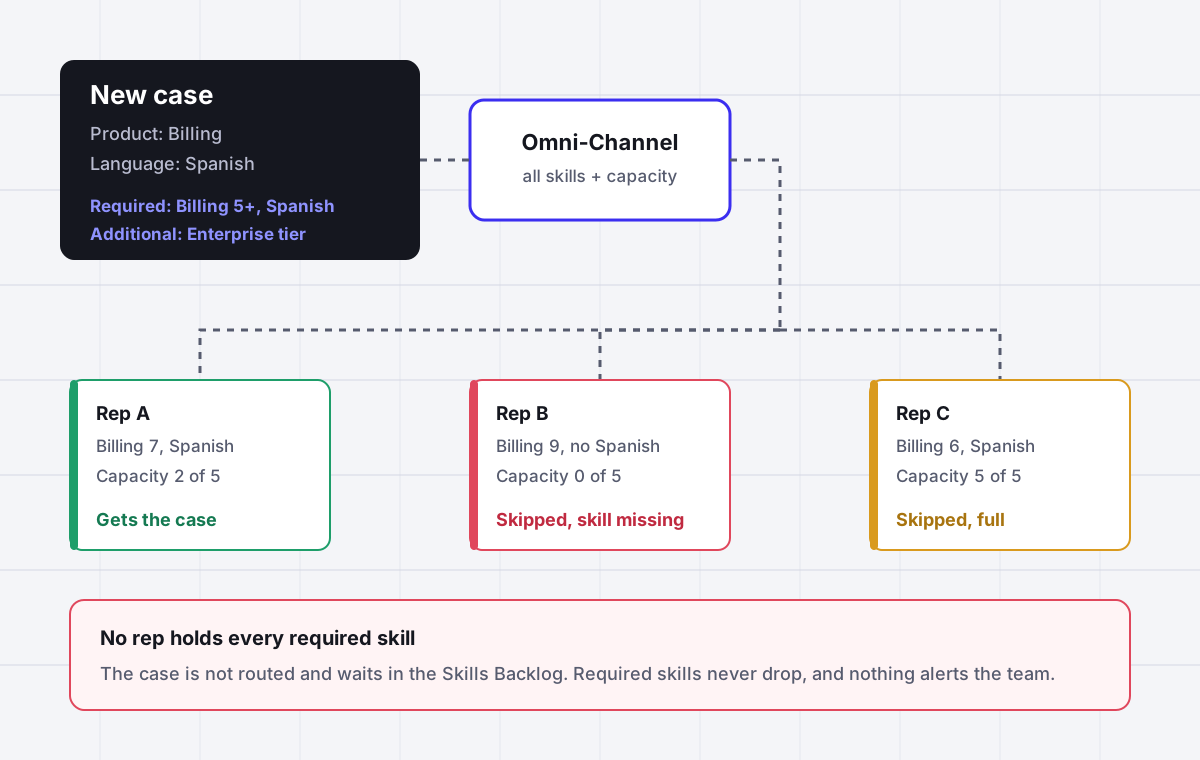
Salesforce skills based routing is an Omni-Channel routing type that sends each work item to a service rep who holds every required skill, meets any minimum skill level, has spare capacity and is chosen by Most Available or Least Active. Skills reach the work item three ways: static skills on the routing configuration, Skills-Based Routing Rules that map up to 10 fields and 100 field values to skills for cases, leads, orders and custom objects, or an Omni-Channel Flow that adds up to 20 skill requirements per item. If no rep holds every required skill, the item is not routed and waits in the Skills Backlog. Salesforce Help lists skills based routing for Enterprise, Performance, Unlimited and Developer Editions with Service Cloud. Assigner routes cases, leads and tasks by skills, workload and live availability beside Salesforce at $7 per user per month billed yearly, with a recorded reason for every assignment.
Why it fits
This page is for a Salesforce Service Cloud admin or support operations lead who routes cases by product, language, tier or region with Omni-Channel, and whose cases sit unassigned in the Skills Backlog, land on the wrong tier after a skill drop, or pile up on the one rep who holds a rare skill.
A missing skill means the case waits, silently
Salesforce Help states it plainly: if a work item requires skills that no rep holds, the work item is not routed. There is no timeout and no fallback for required skills. The only place it shows is the Skills Backlog tab in Command Center for Service, and for chat the request is simply canceled.
Skills are read once, when the case enters the queue
If an agent or a flow changes the product or language on a case that is already waiting, the skills do not change until the record is reassigned to a queue. Routing logic is not reapplied after field changes, so a corrected case keeps hunting for the wrong specialist.
Default skills can block every rule
Skills set on the routing configuration are added to every item routed through it, on top of the rule skills. One admin on the Trailblazer Community found cases falling into a queue instead of reaching available reps, and the cause was a default skill nobody on the team held.
Additional skills drop, then reset on a decline
Skills marked additional are dropped after a timeout of at least 5 seconds, highest priority number first. If the rep who finally receives the case declines it or goes offline, the skills reset and the dropping starts over, which is how Tier 2 cases end up on Tier 1 desks by design.
Two skill scales that do not match
Help asks you to enter a rep skill level from 0 to 10. The SkillRequirement object accepts a required level from 0 to 99.99. A flow that asks for level 50 on a skill rated 0 to 10 matches nobody, and nothing warns you.
Nothing records why a rep got the case
Omni-Channel writes AgentWork and AgentWorkSkill records, and the Route Work action in a flow does not create debug logs. When a specialist asks why they received a case outside their product, the answer takes a report and some detective work.
Side by side
Every way Salesforce attaches skills to a work item, and where each one leaks
| Method | What it does | Limits | Leaks when | What reps see |
|---|---|---|---|---|
| Static skills on the routing configuration | Adds the same skills to every item routed through that configuration | One skill set per routing configuration | Combined with rule skills, so an unheld default skill blocks every match | Cases stuck in a queue while reps sit available |
| Skills-Based Routing Rules | Maps picklist, boolean and lookup field values to skills | Case, Lead, Order and custom objects; one mapping set per object; up to 10 fields and 100 field values | A field changes after routing, since the rules are not reapplied | A case routed on its first product value |
| Omni-Channel Flow with Add Skill Requirements | Adds skills, levels, additional flags and priorities per item, then Route Work | Up to 10 skills per action, 20 per work item; Route Work handles up to 100 records | One record in a collection is missing, so none route; no debug logs from Route Work | Nothing, or the fallback queue if the flow errors |
| Apex with PendingServiceRouting and SkillRequirement | Creates the routing request and skill rows directly, then sets IsReadyForRouting | Record cannot be edited once IsReadyForRouting is true; Salesforce recommends flow or rules instead | Triggers, levels or timeouts drift from what the business expects | Routing that only the developer can explain |
| Additional skills with a drop timeout | Drops optional skills in priority order until someone qualifies | Minimum timeout 5 seconds; priority 0 is dropped last | A rep declines or goes offline and the drop cycle restarts | Specialist work landing on generalists |
| Transfer to a skill set | Moves chat work to reps with chosen skills | Search lists skills from only the first 2,000 created; not available as an icon in Enhanced Omni-Channel | No rep with the skills is free, so the chat is canceled | A dropped chat |
Sources: Salesforce Help articles on how skills based routing works, Skills-Based Routing Rules, the Add Skill Requirements and Route Work flow actions, routing configuration settings and skills based routing limitations; the PendingServiceRouting and SkillRequirement object reference; the Omni Supervisor guide (Winter 27) for editions; and Trailblazer Community and Salesforce Stack Exchange threads. Prices from the Salesforce Service Cloud pricing page, per user per month, read September 2026.
In detail
How Salesforce skills based routing really works, and what admins end up building
How does skills based routing work in Salesforce?
When a work item is created, Omni-Channel collects its required skills from three places: static skills on the routing configuration, Skills-Based Routing Rules, and any skill requirements passed in by the Route Work action of an Omni-Channel Flow. It then looks for a service rep who holds every one of those skills, meets any minimum skill level, and has spare capacity. Among the reps who qualify, the routing model decides: Most Available picks the rep with the most free capacity, Least Active picks the one with the fewest open items.
Queue based and skills based routing can live in the same org. Salesforce describes a queue as a structure designed to represent one skill, so queue routing asks only whether the rep is a member of the queue. Skills routing replaces that membership test with a skill match. That is the real value of the feature: one queue can serve every combination of product, language and tier without an admin building a queue for each combination.
The setup chain is long and every link matters. Enable skills based and direct to agent routing in Omni-Channel Settings, create the skills, create an active Service Resource of type Agent for each rep and attach skills with optional levels and start and end dates, then either build a skill mapping set and tick Use with Skills-Based Routing Rules on the routing configuration, or build an Omni-Channel Flow. Miss the Service Cloud User checkbox or a presence configuration and the rep never receives anything, which is the accepted answer on more than one forum thread.
Why is my case not routed to an agent with the right skills?
Four causes account for most tickets on this topic, and none of them produces an error.
Nobody holds every required skill. Salesforce Help says it directly: if a work item requires certain skills but no service reps have those skills, the work item is not routed, similar to how items in a queue are treated when no reps are online. The Omni Supervisor guide adds that the item is placed in the backlog. There is no timeout for required skills, so a case asking for a skill combination that nobody on shift holds waits until a person notices it on the Skills Backlog tab.
A default skill on the routing configuration. A Trailblazer thread from October 2024 describes cases falling into a queue instead of reaching the available agent. The admin had ticked Use with Skills-Based Routing Rules and also selected default skills on the same routing configuration, and the default skills made matching impossible. Another admin replied that they had spent days on the same problem across several sandboxes.
The rep is not set up to receive work. The Service Resource must be active, the user needs the Service Cloud User checkbox, and the rep needs a presence configuration with enough capacity. The Salesforce troubleshooting article for Omni-Channel routing adds that Units of Capacity for In-Progress Work Items in the routing configuration must be less than or equal to the rep capacity, or routing blocks.
The queue has no routing configuration. Salesforce notes that work is not assigned to a support rep if the queue does not have one, and that mixing object types in one queue can cause routing conflicts. When a case sits in a queue with reps online, check the queue before the skills.
Skills-Based Routing Rules versus Omni-Channel Flow
Skills-Based Routing Rules are the declarative path. You create one skill mapping set per object and map picklist, boolean and lookup field values to skills, up to 10 fields and 100 field values. The rules support Case, Lead, Order and custom objects. They are quick to build and easy to read, and their limit is timing: routing logic is applied when work is assigned to an owner, and if field values change after the item is routed, the logic is not reapplied.
Omni-Channel Flow is the flexible path and the one Salesforce steers new builds toward. The Add Skill Requirements action takes up to 10 skills per action and 20 per work item, each with a level, an additional flag and a priority, and the Route Work action can also run the skills based routing rules, or both. Three details catch teams in production. If a Route Work action receives a collection and cannot find one record, it rolls back and routes none of them. Route Work does not create debug logs. And when you migrate a flow, the skills referenced in its actions and the routing rules it calls are not migrated, so a deployment that looks clean can arrive in production with routing that matches nothing. The troubleshooting article also recommends removing and re-adding the Route Work element when a queue ID is wrong after deployment.
If a flow errors while it runs, the work item goes to the fallback queue set on the service channel. Set one deliberately; it is the only safety net the flow path has.
Additional skills, drop timeouts and why Tier 2 cases reach Tier 1
A skill marked additional is a preference rather than a requirement. If no rep holds every required and additional skill, Omni-Channel drops additional skills in order after the Drop Additional Skills Time-out, which cannot be lower than 5 seconds, and routes the item to the best matched rep even if that rep lacks the dropped skills. The numbering runs backward from what most admins expect: higher priority numbers are dropped first, and priority 0 is dropped last, so 0 means most important.
The reset rule is where teams lose control. Salesforce Help says that if the rep declines the work or goes offline, the required skills reset to their original state and the dropping starts over. A PrismHR admin described the result on the Trailblazer Community in 2021: Tier 2 cases waited 60 seconds, the timeout they had set, then passed to Tier 1, and Salesforce support called it working as designed. The workaround that thread settled on was to split each skill into a Tier 1 and a Tier 2 version, which doubles the skill list to fix a routing rule. If tier matters contractually, do not model it as an additional skill.
Skill levels in Salesforce, and the scale nobody mentions
When you attach a skill to a rep, Help invites you to enter a level from 0 to 10, based on how your business measures skill. When you ask for a skill on a work item, the SkillRequirement object accepts a SkillLevel from 0 to 99.99. The two are compared directly. A flow that requires level 60 on a skill rated 0 to 10 finds nobody, and the case waits in the backlog like any other unmatched item.
Pick one scale for the whole org, write it into the skill descriptions, and keep required levels at or below the ratings you actually hand out. Rep skills also carry start and end dates, so a certification that must be renewed every six months can expire on its own. That is useful and also a quiet source of backlog, because an expired skill removes a rep from every match that needed it on the day it lapses.
Which Salesforce editions include skills based routing, and what it costs
The Omni Supervisor guide for Winter 27 lists skills based routing for Omni-Channel as available in Enterprise, Performance, Unlimited and Developer Editions with Service Cloud. Omni Supervisor itself is also available in Essentials and Professional, so seeing the Skills Backlog tab in a lower edition does not mean you can route by skills there.
The Service Cloud pricing page now sells under new names: Starter Suite at $25 per user per month, Pro Suite at $100 billed annually with a contract, Core at $195, Advanced at $395 and Max at $550, all billed annually. Omni-Channel Routing is marked on every edition except Starter Suite, and Enhanced Omni-Channel on all five. The pricing page has no separate line for skills based routing and does not say which new edition corresponds to Enterprise, so ask for skills based routing by name in the quote rather than assuming it comes with Omni-Channel. For a 20 rep team the gap between Pro Suite and Core is $22,800 a year at list, which is real money to spend on one routing feature.
Standard Omni-Channel is retired with the Summer 26 release and orgs are upgraded to Enhanced Omni-Channel automatically. In Enhanced, skills live on each rep Service Resource rather than on users and profiles, and the transfer to skill icon is not available, so routing that depended on those parts of Standard needs a second look after the upgrade.
Where Assigner fits beside Salesforce skills based routing, and where it does not
If your reps live in the Service Console all day, you are on an edition that includes skills based routing, and your skill map fits the rules, use Omni-Channel. It pushes work in real time with presence and capacity, and nothing outside Salesforce does that inside the console as well.
Assigner is for the gaps. It routes cases, leads and tasks by skills with ordered fallback steps you define, so a missing skill widens to a named group after a set time instead of waiting silently or dropping a tier requirement. It weighs open workload and live availability, skips people who are out, and records the rule and the reason on every assignment, so the question of why a rep got a case has a one line answer. The same rules also cover leads and internal requests that Omni-Channel does not see. It works beside Salesforce as a companion rather than a live two way sync, and costs $7 per user per month billed yearly ($15 billed monthly). If you are weighing help desks on skills routing, our comparison of skills based routing software lays out which plan unlocks it at Zendesk, Freshdesk, Zoho Desk and ServiceNow.
Questions buyers ask
Frequently asked questions
How does skills based routing work in Salesforce?
Omni-Channel gathers the required skills of a work item from the routing configuration, Skills-Based Routing Rules and any Omni-Channel Flow, then routes it to a rep who holds every required skill, meets any minimum level and has spare capacity, choosing among qualified reps by Most Available or Least Active.
What happens if no agent has the required skill?
The work item is not routed. It waits in the backlog and appears on the Skills Backlog tab in Command Center for Service, with no timeout for required skills. For chat, the request is canceled when no rep with the skills is available or everyone qualified is at capacity.
What are skills based routing rules in Salesforce?
They are declarative mappings from field values to skills. You create one skill mapping set per object and map picklist, boolean and lookup values, up to 10 fields and 100 field values. They support Case, Lead, Order and custom objects and need Use with Skills-Based Routing Rules ticked on the routing configuration.
Does skills based routing re-route a case when a field changes?
No. Skills are evaluated when the record is added to an Omni-Channel queue, and routing logic is not reapplied if fields change afterward. Reassign the record to the same or another queue to make the new skills count.
What is an additional skill in Omni-Channel?
An optional skill that Omni-Channel drops after the Drop Additional Skills Time-out, minimum 5 seconds, if nobody holds every skill. Higher priority numbers drop first and priority 0 drops last. If the rep declines or goes offline, the skills reset and the drop cycle starts over.
How many skills can a work item have?
With an Omni-Channel Flow, up to 10 skills per Add Skill Requirements action and 20 skills overall per work item. Skills-Based Routing Rules map up to 10 fields and 100 field values per object mapping set.
What skill levels does Salesforce support?
Rep skills take an optional level from 0 to 10 in Setup, while the SkillRequirement object accepts a required level from 0 to 99.99. Use one scale across the org, because a required level above every rep rating matches nobody.
Which Salesforce edition includes skills based routing?
Salesforce Help lists it for Enterprise, Performance, Unlimited and Developer Editions with Service Cloud. The current pricing page shows Omni-Channel Routing on Pro Suite, Core, Advanced and Max but has no separate line for skills based routing, so confirm it by name in your quote.
Can I use queue based and skills based routing together?
Yes. Salesforce supports routing some work items by queue and others by skills in the same org. Each queue uses one routing configuration, so decide per queue which method applies.
Does skills based routing work for voice calls?
Salesforce documentation contradicts itself. The limitations article says skills based routing supports voice calls with Omni-Channel Unified Routing only, while another routing article still says you cannot use it for voice. Test it in a sandbox with your telephony setup before you commit.
Why does Omni-Channel ignore my default skills setting?
It does not ignore it; it adds those skills to every item on that routing configuration, on top of the rule skills. If nobody holds the default skill, nothing matches and cases fall back to the queue. Remove default skills when you route with rules.
What does skills based routing software cost outside Salesforce?
Help desk suites put skill matching on upper tiers: Zendesk Suite Professional at $115 per agent per month and Freshdesk Enterprise at $89, billed annually. Assigner routes by skills, workload and availability at $7 per user per month billed yearly, beside the tools you already use.
Keep reading
Related Salesforce routing pages worth reading next:
- Salesforce Omni-Channel routing - Routing configurations, capacity and the queue side of Omni-Channel.
- Omni-Channel not assigning work - The checklist when work sits in a queue with reps online.
- Salesforce case assignment rules - The rule engine that decides the queue before Omni-Channel picks the rep.
- Salesforce queue assignment - Which objects support queues and how work leaves them.
- Enhanced Omni-Channel migration - What changes for skills and service resources after the upgrade.
- Best skills based routing software - Which plan unlocks skill matching across help desks, with prices.
- Skills based routing in Assigner - Skills with ordered fallback steps and a reason on every assignment.
Stop hand-sorting your incoming work
Let Assigner route it to the right available person by skill, workload, and availability, using rules you control. Nothing sits unassigned and no one gets cherry-picked. Every assignment shows why.