ServiceNow Vulnerability Assignment Rules in Vulnerability Response with Reapply and Scripted Assignment
The Qualys or Tenable import finishes overnight and 4,000 new vulnerable items land in Vulnerability Response. By morning a few hundred have no assignment group, the rule you fixed last week has not touched the old ones, and the remediation tasks that did get a group are waiting for someone on the server team to notice them. None of that is a broken instance. It is exactly how the assignment rules were designed.
In short
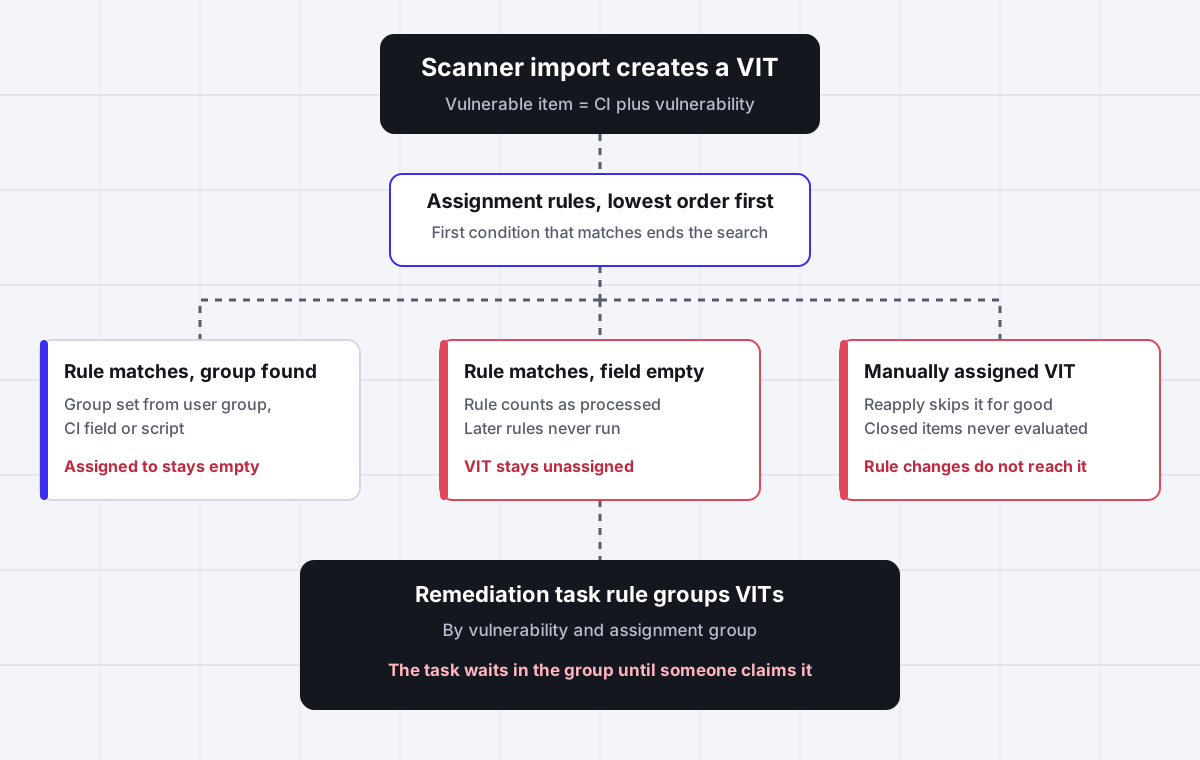
ServiceNow vulnerability assignment rules (Vulnerability Response, Administration, Assignment Rules) set the assignment group on each vulnerable item, from a fixed user group, a field on the CI such as its support group, or a script. They run from the lowest order to the highest, the first rule whose condition matches ends the search even when the field it reads is empty, and they only evaluate open items that nobody assigned by hand. They choose a team. They never choose the person in that team who should patch the server, which is the part Assigner adds.
Why it fits
This page is for a ServiceNow Vulnerability Response admin, vulnerability manager or SecOps lead whose vulnerable items land without an assignment group, keep the wrong group after a rule change, or reach the right team but sit there unowned while remediation SLAs run out.
A matched rule with an empty field still wins
ServiceNow product success guidance is explicit: if the condition is met, the assignment rule is considered processed, regardless of whether data is available for assignment. A rule that reads the CI support group stops the search on a CI with no support group, and the item stays unassigned while your fallback rule further down never runs.
Manual assignment switches the rules off for good
Rules evaluate open vulnerable items at creation, update and reopen, but only items that were not assigned by hand. Once an analyst reassigns an item, reapplying the rules will not touch it again, so every manual fix becomes a permanent exception.
Fixing a rule does not fix existing items
Changing a rule sets a Reapply flag on open, not manually assigned items, but nothing happens until you select Apply Changes. The scheduled job Reapply all vulnerability assignment rules ships inactive, so a corrected rule only affects new imports unless someone runs it.
Scripted rules need a default group
A ServiceNow employee answer states it plainly: once a match is found, VR stops processing the rules and expects an assignment group. If the lookup script returns nothing and no default assignment group is set, the item is unassigned.
Regrouping is off by default
Remediation task rules group vulnerable items into units of work, out of the box by vulnerability and assignment group. Reassigning an item does not move it to a different remediation task unless the property sn_vul.rerun_task_rules is set to true, and it ships false.
A group is still not an owner
Every native path ends at the assignment group. Inside the group the remediation task waits until someone claims it, so the same two engineers patch everything while the rest of the team never sees the queue. No rule balances load, checks who is out or records why.
Side by side
How a ServiceNow vulnerable item gets an owner, and where each path leaks
| Method | What it sets | When it runs | Leaks when | Picks a person |
|---|---|---|---|---|
| Assignment rule to a user group | A fixed assignment group | Create, update or reopen of an open, not manually assigned item | Condition too broad, or ordered below a rule that matches first | No |
| Assignment rule from a CI field | Group read from the CI, such as support group | Same as above | The CI field is empty, yet the rule counts as processed | No |
| Scripted assignment rule | Group, and optionally a user, returned by the script | Same as above | Script returns nothing and no default assignment group is set | Only if the script sets one |
| Reapply assignment rules | Recalculated group on flagged items | Only after Apply Changes, or the scheduled job if activated | Item was assigned by hand, closed or inactive | No |
| Remediation task rule | Groups items into a remediation task with the group | When an item is grouped | Item reassigned later and sn_vul.rerun_task_rules is false | No |
| Analyst reassigns by hand | Any group or person | Whenever someone edits the item | Rules never touch that item again | Yes, by hand |
Sources: ServiceNow Product Success webinar Vulnerability Response Recommended Practices, Classification and Assignment Rules (February 2023), the ServiceNow Vulnerability Response implementation success checklist, and answers by ServiceNow employees in the ServiceNow Community SecOps forums.
In detail
How vulnerability assignment rules really behave in ServiceNow, and what admins end up building
How ServiceNow vulnerability assignment rules choose a group
Assignment rules live under Vulnerability Response, Administration, Assignment Rules. Each rule has a name, an order, a condition built in the condition builder, and an assignment option. ServiceNow describes three options in its own recommended practices: assign to a user group when the CMDB is immature, assign from a field on the CI such as its support group or managed by group, or assign with a script for more complex and relational lookups.
The engine is simple, and that is the source of most surprises. Rules are executed from the lowest order to the highest. For each vulnerable item, the first rule whose condition matches is applied and the search stops. The product success team spells out the detail that catches people: if the condition is met, the rule is considered processed, regardless of whether data is available for assignment. So a rule that says Assign from CI support group for every Windows server will happily match a server whose CI has no support group. The item ends up with no group, and the catch-all rule you placed at order 1000 never gets a chance.
Two practical consequences follow. First, write conditions that cannot match when the field they read is empty, for example by adding Configuration item, Support group, is not empty to the condition. Second, put a default assignment rule at the highest order, pointing at a triage group, so anything that falls through every specific rule still lands somewhere a person looks every day.
Rules with the same order number do not run together. A ServiceNow presenter answered that question directly in the webinar Q and A: it is a race, first accessed, first executed. Give every rule a unique order and leave gaps of 100 so you can insert rules later without renumbering.
When assignment rules run, and the vulnerable items they never touch
ServiceNow states that items are assessed for assignment at creation, update or reopen of a vulnerable item in an Open state. In practice that means the scanner import is the main trigger. When the CI on an item changes, the business rule Run assignment rules evaluates it again.
Three kinds of items sit outside that loop, and each one creates its own backlog.
- Manually assigned items. Rules apply only to open items that have not been reassigned by hand. In the words of the same Q and A, once an item is manually reassigned the system would not touch that item. A well meant fix by an analyst becomes a permanent exception to every future rule change.
- Closed or inactive items. A Community thread from an Application Vulnerability Response user confirms that rules do not run on items that are closed, already assigned to a group, or inactive. Two ServiceNow employees answered. One suggested reusing the code of the Run assignment rules business rule in a scheduled job. The other pointed out that no rules will run for an item that is already assigned, so a historical import should leave the assignment group empty and close items in a second pass.
- Items whose context changes elsewhere. If the resource tag on a discovered item changes from Servers to Hardware, the vulnerable items under it are not reevaluated, because the business rule fires on updates to vulnerable items, not discovered items. The ServiceNow employee answer recommends a new asynchronous business rule or flow on the discovered item table that finds the related vulnerable items and runs the assignment logic, so the integration import is not slowed down.
If your team reports that new items look right but older ones keep the wrong group, one of these three is almost always the reason.
Reapply assignment rules after you change a rule
Editing a rule does not reassign anything by itself. When you update a rule, ServiceNow sets a Reapply flag to true on open items that were not manually assigned. Nothing moves until someone selects Apply Changes, which starts a background job. The scheduled job named Reapply all vulnerability assignment rules exists but ships inactive, so instances that never turned it on only see rule changes on the next import.
The reapply job runs in the background. Use View status on the rule list, or open the background job table sn_sec_cmn_background_job.list, to see whether it finished. On large estates the job is slow for a reason. ServiceNow guidance says around 46 seconds per item is starting to get high, and for installations with more than a million open vulnerable items it suggests raising the background job thread count from the default of four to six or eight, under Security Operations, Utilities, Background Job Configuration. That needs sn_vul.vulnerability_admin, or a vulnerability manager with the sn_sec_cmn.manage_background_job role.
Vulnerability groups created before a rule existed are a separate case. A ServiceNow employee answer in the SecOps forum is blunt: there is no baseline trigger to apply assignment rules retroactively to existing groups. The options offered were to delete the groups and reprocess the items, call the Link to Vulnerability Groups logic from a script, or copy the group from a member item onto groups that have none.
One more trap sits in change management of the rules themselves. Assignment rules and remediation task rules do not write an XML update record, so they are not captured in your update set automatically. Force them into the update set or export and import them, or a rule tested in your sub production instance never reaches production.
Scripted vulnerability assignment rules and the default group
When the owner lives in a related record, such as the business application or the CI managed by fields, a scripted rule is the usual answer. Choose Script in the Assignment option of the rule. The example a ServiceNow employee gave in the SecOps forum is two lines:
current.assignment_group = current.cmdb_ci.managed_by_group;
current.assigned_to = current.cmdb_ci.managed_by;
Three rules of thumb come out of that thread and the related knowledge article on scripted rules.
- Always set a Default Assignment Group on a scripted rule. Once the condition matches, processing stops and VR expects a group. If the script returns nothing and there is no default, the item is unassigned.
- Check that the user belongs to the group. Setting assigned_to to a person outside the assignment group produces records your analysts cannot work from their group queues.
- Guard the condition. Add conditions so the rule only matches when the lookup can succeed, for example when the CI managed by group is not empty, and let a later rule handle the rest.
Integrations push the same pattern. The Snyk guide for ServiceNow assignment tells AppSec teams to look up the sys_id of the group in the group table for group assignment, and to define a default group, such as the AppSec team, for findings that are not categorized well enough to assign.
Classification rules make assignment rules faster and simpler
Classification groups and rules sit upstream of assignment. Out of the box there are two classification groups, for discovered items and for vulnerability entries, one active group per table. Classification rules run in order from lowest to highest and only one rule applies. They label an item as Application or Platform, with a finer Classification Type below that, and they run when the vulnerability entry is created or when the discovered item is created.
The reason to care is performance and clarity. ServiceNow recommends avoiding CONTAINS conditions in assignment rules because CONTAINS crawls across the whole field, and avoiding dot walked fields where you can. A classification rule on the smaller vulnerability table can do the text matching once, and the assignment rule on the much larger vulnerable item table then uses a cheap IS condition on the classification. That is also how you send an operating system fix to the server team and an application library fix to the application owner without one giant rule.
When a classification rule changes, reapply classification rules from the classification group. All active rules run again, and they can be retrofitted onto existing data.
Remediation tasks, regrouping and the sn_vul.rerun_task_rules property
Remediation task rules, under Vulnerability Response, Administration, Remediation Task Rules, group vulnerable items into units of work for the people who patch. One rule ships out of the box. It groups by vulnerability and assignment group and gives the task that group. A common custom rule groups all high impact items by vulnerability and CI support group.
Two behaviors explain most complaints about tasks that look wrong. Whether an item joins an existing remediation task or creates a new one depends on the state of that task. And reassignment does not regroup. If an analyst or a reapplied rule moves an item to a different assignment group, it stays in its old remediation task unless the system property sn_vul.rerun_task_rules is true. It ships as false.
Turn it on only after you understand the volume. Regrouping on every reassignment is the right behavior for most teams, but on an estate where reapply touches tens of thousands of items, it multiplies background work.
A troubleshooting checklist for unassigned vulnerable items
ServiceNow suggests a simple first diagnostic. Open the vulnerable item list, add the Assignment Rule and Assignment Type columns, and group by Assignment Rule. You see at once which rule is catching the most items and whether a broad rule is shadowing narrower ones because of its order.
- Group open items with an empty assignment group by Assignment Rule. Items with a rule and no group mean the rule matched but its field was empty.
- Items with no rule at all mean nothing matched. Add a default rule at the highest order.
- Filter for items assigned manually. Those will never follow a rule change, so decide whether to clear and reapply them.
- Check whether the scheduled job Reapply all vulnerability assignment rules is active, and check the background job table after Apply Changes.
- Sort third party vulnerability entries by their count of active vulnerable items and write rules for the highest volume vulnerabilities first. That is the starting point ServiceNow recommends.
- Track the number of critical items not assigned, or assigned outside policy, as a standing report. The ServiceNow implementation checklist uses exactly those questions, and gives 90 percent assignment accuracy, with items assigned to the right team the first time, as an example success target.
Where Assigner fits beside Vulnerability Response, and where it does not
If your estate is small and your CMDB is clean, native rules are enough. Guard every CI field condition, add a default rule, activate the reapply job, and set sn_vul.rerun_task_rules to true. That fixes most of what goes wrong at the group level.
The gap opens one step later. Vulnerability Response decides which team owns a remediation task and then stops. Inside the server team or the application team, the task waits until someone claims it. The engineer who checks the queue first gets the work, the one on vacation still shows as a candidate, and nobody can say afterward why a critical item sat for nine days. VR has no rotation, no load cap per engineer and no record of why a person was chosen, because it never chooses a person.
Assigner sits beside ServiceNow and does that last step. It takes the remediation task or the vulnerable item once VR has set the group, and assigns it to one engineer in that group by round robin or by current load, skipping people who are out or already at their cap, matching skills such as Windows, Linux or a specific application where you define them, and writing the reason on every assignment. ServiceNow stays the system of record for vulnerability data, risk scores, CI matching, exceptions and remediation states. Assigner does not replace any of that, and it does not guarantee that a patch lands inside your SLA.
It is priced per person who receives work, from $7 per user per month billed yearly on Starter, with load balanced routing on Team at $18. A remediation team of 15 engineers is priced on 15 seats, not on everyone who can open the vulnerability workspace.
Questions buyers ask
Frequently asked questions
What are vulnerability assignment rules in ServiceNow?
They are records under Vulnerability Response, Administration, Assignment Rules that set the assignment group on each vulnerable item. Each has an order, a condition and an assignment option: a fixed user group, a field on the CI such as support group, or a script. They run lowest order first and the first match ends the search.
When do vulnerability assignment rules run?
They assess vulnerable items at creation, update or reopen while the item is in an Open state, so the scanner import is the main trigger. They do not evaluate items that were assigned by hand, items that are closed or inactive, or items that already carry an assignment group.
How do I reapply assignment rules in Vulnerability Response?
After editing a rule, open the assignment rule list and select Apply Changes. That starts a background job on open items flagged for reapply. The scheduled job Reapply all vulnerability assignment rules ships inactive, so activate it if you want changes picked up automatically. Manually assigned items are never reapplied.
Why are my vulnerable items unassigned?
Usually one of three things. A rule matched but the CI field it reads was empty, which still counts as processed. No rule matched and there is no default rule at the highest order. Or a scripted rule returned nothing and had no default assignment group. Group the list by Assignment Rule to see which.
How do I write a scripted vulnerability assignment rule?
Set the Assignment option to Script and set current.assignment_group, and optionally current.assigned_to, from a related record such as current.cmdb_ci.managed_by_group. Always fill in the Default Assignment Group on the rule, because if the script returns nothing the item is otherwise left unassigned.
Do assignment rules run on closed vulnerable items?
No. Rules skip items that are closed, inactive or already assigned. ServiceNow employees in the Community suggest leaving the group empty during a historical import and closing items in a second pass, or reusing the Run assignment rules business rule logic in a scheduled job.
Do assignment rules apply to existing vulnerability groups?
Not retroactively. A ServiceNow employee answer states there is no baseline trigger for groups created before the rule existed. The usual fixes are deleting and reprocessing the groups, calling the Link to Vulnerability Groups logic from a script, or copying the group from a member item.
What does sn_vul.rerun_task_rules do?
When true, a vulnerable item that is reassigned to another group is regrouped into the right remediation task. It ships as false, so by default a reassigned item stays in its old remediation task with the old team.
Why does my assignment rule not reach production?
Assignment rules and remediation task rules do not write an XML update record. They are not captured in your update set automatically, so force them into the update set or export and import them between instances.
What order should vulnerability assignment rules have?
Put the most critical and most specific assignments at the lowest order, give every rule a unique number with gaps between them, and place a default rule pointing at a triage group at the highest order. Rules with the same order run in whichever order they are read.
Can ServiceNow Vulnerability Response assign remediation tasks to a person automatically?
Only through a scripted rule that sets assigned_to from a fixed field such as the CI managed by user. There is no out of box rotation or load balancing inside the assignment group, so the remediation task waits until someone claims it.
What does vulnerability remediation assignment software cost?
Assigner is $7 per user per month billed yearly on Starter, or $18 on Team for load balanced routing, with plans from 5 users. You count the engineers who receive remediation work, not everyone who can view vulnerabilities.
Keep reading
Related ServiceNow routing pages worth reading next:
- ServiceNow security incident assignment - Why security incidents land in SIRT even in manual mode, and how SIR auto-assignment scores analysts.
- ServiceNow assignment rules - The platform assignment rules that ITSM tables use, and the empty field rule behind skipped assignments.
- ServiceNow assignment group - How groups, members and managers decide which team sees the work.
- ServiceNow change task assignment - Most remediation ends in a change, and its tasks need an owner too.
- ServiceNow round robin - Why native rules have no rotation, and what Advanced Work Assignment actually does.
- ServiceNow group types - Why a group can be missing from a picker on one table and visible on another.
- ServiceNow assignment rules not working - A checklist for rules that match but never fire.
Stop hand-sorting your incoming work
Let Assigner route it to the right available person by skill, workload, and availability, using rules you control. Nothing sits unassigned and no one gets cherry-picked. Every assignment shows why.