ServiceNow Security Incident Assignment Rules and Security Incident Response Task Assignment
A phishing report comes in at 6:40 in the morning and becomes a security incident. It lands in the SIRT group, the same as every other incident this week, because nobody remembers the rule that puts it there. The analyst on the early shift is in Denver, the auto-assignment score picks someone in Boston who has eleven open incidents, and the response tasks the playbook created sit in the group with nobody named on them. Every piece of that is configured behavior.
In short
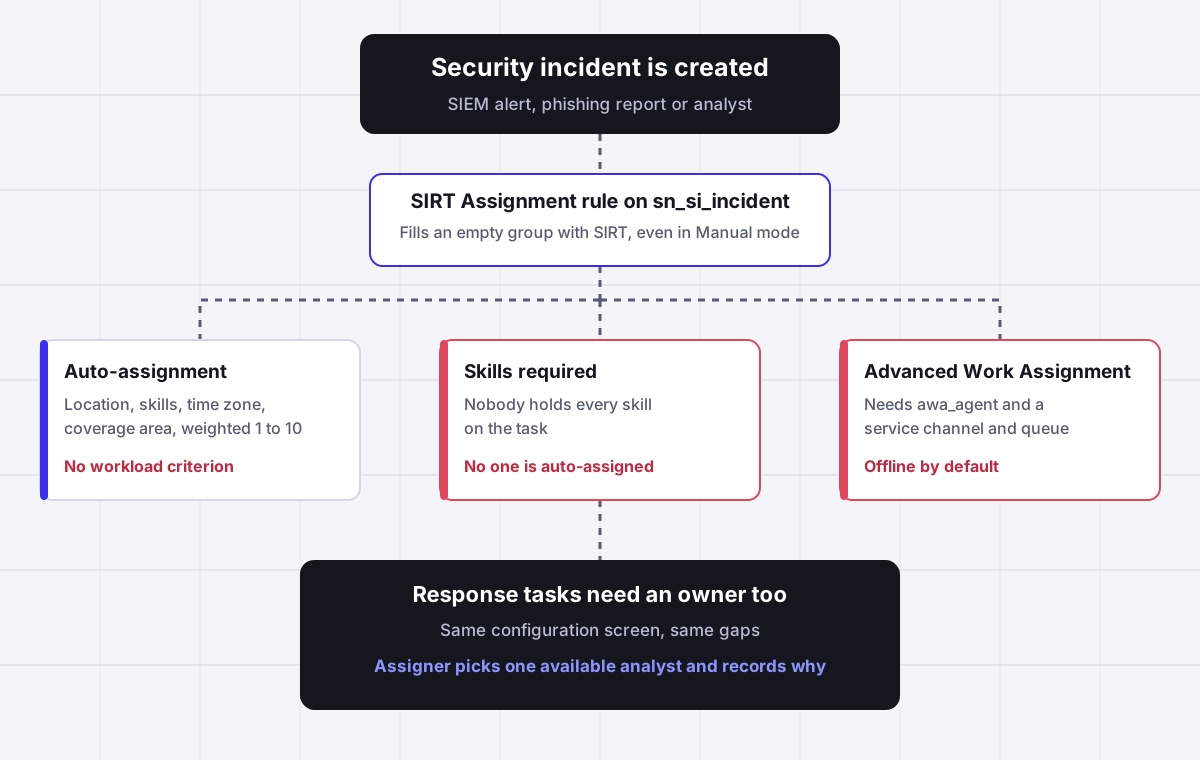
ServiceNow security incident assignment works in two layers. An assignment rule named SIRT Assignment on the sn_si_incident table fills an empty assignment group with the SIRT group, and it keeps doing that even when the Security Incident Response configuration is set to assign analysts manually, because the setting and the rule are separate. The analyst is then chosen by one of four methods set on the Assignment tab of the SIR configuration screen: manually, by a workflow, by auto-assignment, or by Advanced Work Assignment. Auto-assignment scores analysts on location, skills, time zone and group coverage area with weights from 1 to 10, and none of those criteria counts open work. Assigner adds that missing step: it assigns each security incident and response task to one available analyst by load, skill and shift, and records the reason.
Why it fits
This page is for a ServiceNow Security Incident Response admin, SOC manager or SecOps lead whose security incidents all land in one group, wait for someone to claim them, or pile onto the same analyst, and who needs each incident and response task assigned to one available analyst with a recorded reason.
Manual mode does not stop the SIRT group
A ServiceNow employee answered two separate community threads the same way. Security incidents keep landing in SIRT because an assignment rule called SIRT Assignment on sn_si_incident sets it. Changing the configuration to manual does not touch that rule; you deactivate it or replace it with your own.
Auto-assignment never looks at workload
The documented auto-assignment criteria are location, skills, time zone and group coverage area, each rated from 0 to 1 and weighted from 1 to 10. Open incidents per analyst is not one of them, so the closest, best matched analyst keeps winning while their queue grows.
A missing skill means nobody gets it
ServiceNow states that if no agents possess all the skills required to perform the task, no one is auto-assigned. One extra skill on a security incident, such as cloud forensics, can leave it with a group and no analyst.
Advanced Work Assignment starts with everyone offline
With AWA the incident goes to analysts with the sn_si.analyst and awa_agent roles who are Available in the SIR Workspace inbox. Offline is the default presence, so on a morning when nobody has changed status, incidents queue and nothing is assigned.
Response tasks follow the same screen
The assignment method on the SIR configuration screen applies when someone or the application creates a security incident or generates a security response task. A playbook that creates six tasks inherits every gap above six times.
Every assignment needs a reason
Security leads are asked after an incident why it sat for two hours or why one analyst handled four of the five criticals. Native assignment records who has the incident, not why they got it. Assigner writes the rule, load and availability behind each assignment.
Side by side
How a ServiceNow security incident gets an analyst, and where each method leaks
| Method | What it sets | What it considers | Leaks when | Explains the choice |
|---|---|---|---|---|
| SIRT Assignment rule (baseline) | Assignment group SIRT on an incident with an empty group | Only that the group is empty | You want tiered or regional groups and the rule is still active | No |
| Manual assignment | Whatever an analyst or lead picks in the form or workspace | Human judgment | Nobody is watching the queue at night or on a weekend | Only in work notes, if someone writes them |
| Workflow assignment | Group and analyst set by the selected workflow | Whatever the workflow logic checks | The workflow is retired, edited in one instance only, or errors silently | No |
| Auto-assignment | One analyst, by the highest weighted score | Location, skills, time zone, group coverage area | The best scored analyst is already overloaded, or nobody holds every required skill | No |
| Advanced Work Assignment | Offers or assigns to an analyst in the inbox | Presence, capacity, optionally skills | Analysts are Offline, roles are missing, or rejection is off and the item waits | Partly, through AWA work item records |
| Assigner beside ServiceNow | One available analyst in the right group, written back to the record | Open load, skills, shift and out of office, in rules you set | Rules are wrong, which you can see because each assignment shows its reason | Yes, on every assignment |
Sources: ServiceNow product documentation for Security Incident Response (Assigning security analysts, Assign Security Incidents, Handle security incidents using Advanced Work Assignment, Create post incident review assignment rules, Yokohama and Zurich releases) and ServiceNow Community secops forum threads answered by a ServiceNow employee. Confirm the behavior in your own instance before relying on any row, because plugins and customizations change it.
In detail
How ServiceNow assigns security incidents, and what SOC teams end up building
Why every security incident lands in the SIRT group
Most teams discover this when they create their first tiered groups. A new security incident is submitted with the assignment group empty, and on save it shows SIRT. A user asked exactly that in the ServiceNow secops forum: whenever a security incident is submitted it picks SIRT as the assignment group, and he wanted it to go to a new group called Security Tier 1 instead. A second user had the opposite complaint. He had set the assignment option to manual and still saw SIRT populated on every new record.
A ServiceNow employee gave the same answer in both threads. There is an assignment rule on the sn_si_incident table called SIRT Assignment, and that rule is what puts the group there. The fix is to set that rule to Active false and create your own assignment rule for the default group you actually want, using the baseline rule as a reference.
The detail worth understanding is why the manual setting did not help. The assignment method on the Security Incident Response configuration screen decides how an analyst is chosen. The SIRT Assignment rule is an ordinary platform assignment rule, under System Policy, Rules, Assignment, and platform assignment rules fill an empty assignment group on insert regardless of what the SIR configuration says. Two settings, two owners, and nothing on either screen mentions the other.
Once you deactivate it, write your replacement rules carefully. Platform assignment rules only act on records that do not already have an assignment, so a rule never overrides a group set by an integration, a playbook or a person. If your SIEM integration already writes a group, the rules never see the incident at all.
The four ways SIR can choose the analyst
The Assignment tab of the Security Incident Response configuration screen offers four approaches, and the documentation describes each one in a sentence.
- Manually. Security analysts are assigned by hand whenever someone or the SIR application creates a security incident or generates a security response task. ServiceNow positions this for teams with few analysts.
- Using a workflow. A selected workflow assigns the analyst whenever an incident or response task is created, so the logic lives wherever the workflow lives.
- Using auto-assignment. The platform scores analysts against criteria you choose and assigns the highest score.
- Advanced Work Assignment. AWA automatically assigns security incidents to analysts based on their availability, capacity and, optionally, skills, through service channels and queues.
Each one is a reasonable choice for a certain team size, and each fails in a predictable way. Manual depends on someone watching the queue, which is precisely what does not happen at 3 in the morning. A workflow is invisible logic that nobody wants to touch two years later. Auto-assignment is precise about geography and skills and silent about load. AWA is closest to a real routing engine, but it brings presence, capacity and service channel configuration that a small SOC rarely maintains well.
How SIR auto-assignment scores analysts
Auto-assignment is the option most teams pick first, because it looks like intelligent routing. ServiceNow documents four selection criteria, each producing a rating from 0 to 1 for every eligible analyst.
- Location. Analysts are rated on the distance between the home location in their user record and the location of the task. The closest analyst rates 1, and the rating falls to 0 beyond 100 miles.
- Skills. The rating is the share of the required skills the analyst holds, Skills_agent divided by Skills_task.
- Time zone. The rating is 1 minus the absolute difference between the task time zone and the analyst time zone divided by 12. An analyst twelve hours away rates 0.
- Group coverage areas. Analysts are matched on the coverage area defined in their user records.
You give each criterion a priority from 1, less important, to 10, important, and the final score is the sum of each rating multiplied by its weight. The analyst with the highest score gets the incident.
Read that list again and notice what is missing. There is no criterion for how many security incidents or response tasks an analyst already has open. The analyst in the right city, with the right skills, in the right time zone wins every time, including the eleventh time that morning. A SOC that sets location and time zone heavily, which is the common setup for a follow the sun team, concentrates work on whoever sits closest to where the incidents are reported.
Skills have a harder edge. ServiceNow states that if no agents possess all the skills required to perform the task, no one is auto-assigned. Add a rare skill to a category of incident, malware reverse engineering for example, and every incident in that category arrives with a group and no analyst. Nothing errors and nothing alerts. The incident simply waits.
Advanced Work Assignment for security incidents
AWA moves security incident assignment closer to a contact center model. Analysts need the sn_si.analyst and awa_agent roles, work arrives in the Inbox of the Security Incident Response Workspace, and whether an analyst gets an incident depends on the configured service channel, queues and assignment rules, plus their presence.
Presence has three states. Available means the analyst can accept security incidents, Away means they are not available for new assignments, and Offline is the default. That default matters more than it sounds. On a quiet morning nobody opens the inbox and changes status, so new incidents queue and AWA assigns nothing. The incident is routed but not owned.
If auto-assignment is on in AWA, incidents are assigned to the analyst directly. Otherwise they are offered and the analyst accepts. An analyst can reject with a reason only if rejection handling has been enabled; without it the Reject option is not shown. AWA measures capacity in work items, not in effort, so a containment incident with forty hours of work and a closed false positive weigh the same.
AWA is a strong choice for a large SOC with defined channels and disciplined presence. For a five to fifteen person security team it is often more configuration than the team will maintain, which is why so many instances run auto-assignment or plain manual pickup instead.
Security incident response tasks and post incident reviews
A security incident is rarely one record. Playbooks and analysts create security response tasks for containment, evidence collection, user notification and remediation, and the assignment method on the configuration screen applies to those tasks as well as to the incident. If your method leaves incidents with a group and no analyst, it leaves every generated task the same way, multiplied by the number of tasks in the playbook.
The common symptom is a closed or stalled incident with two or three tasks still sitting in a group queue. The incident owner assumed the network team would pick up the firewall block; the network team assumed the task was informational. Nobody was named.
Post incident reviews have their own assignment rules, under Security Incident, Administration, Post Incident Review, Assessments Setup, in the User Assignment Rules section. Each rule has an order, a condition on the security incident, assignment options for users, roles or email addresses, and an optional assignment group, in which case all active members of the group with the sn_si.analyst role are added to the review. ServiceNow notes that only the first matching assignment rule is executed, so a broad rule with a low order number silently shadows every specific rule below it. That is the same first match pattern that causes problems in Vulnerability Response assignment rules.
A practical setup that keeps security incidents owned
The structure that holds up is the same whatever method a team started on.
- Deactivate SIRT Assignment and write explicit group rules. One rule per category or region, each with a unique order, and a catch all rule at the highest order that points at a triage group someone actually watches.
- Keep skills short. Require only the skills an incident cannot be worked without. Put nice to have skills in the weighting, not in the required list, so an incident is never left with nobody qualified.
- Decide where load is counted. Auto-assignment does not count it and AWA counts items, not effort. If fairness matters, something has to count open incidents and tasks per analyst and weight critical work higher.
- Respect shifts. Time zone scoring is not a schedule. An analyst inside the right time zone who is off shift still scores well.
- Assign tasks, not just incidents. Every response task should have a named owner when it is created, from the same rules.
- Record the reason. When the CISO asks why a critical waited, you want the rule, the load and the availability at that moment, not a guess.
Points three to six are where a native configuration gets expensive, either in custom script or in AWA administration. That is the part Assigner is built for.
How Assigner assigns security incidents beside ServiceNow
Assigner sits beside your ServiceNow instance and decides who gets each security incident and response task. ServiceNow keeps the incident, the playbook, the evidence and the audit trail. Assigner reads the new record, applies your rules and writes the assignment group and assigned analyst back.
- Load counted the way your SOC counts it. Open security incidents and response tasks per analyst, with critical and high severity weighted heavier, so the analyst with four open criticals is not next in line.
- Skills without dead ends. Required skills narrow the group; if nobody available holds them, the incident escalates to a named fallback instead of waiting unassigned.
- Shifts and out of office. Analysts off shift or out are skipped, which time zone scoring alone cannot do.
- One rule set for incidents and tasks. Response tasks get an owner the moment the playbook creates them.
- A reason on every assignment. Each one records the rule, the load and the availability behind it, for example skill match, lowest open load and on shift.
Pricing is per user: Starter at $7 per user per month billed yearly, with load balancing on Team at $18 and advanced rules on Business at $36, all billed yearly, from 5 users. Assigner does not replace Security Incident Response, playbooks or threat intelligence, and it does not guarantee response times. It makes sure every security incident has one accountable analyst, and that you can say why.
Questions buyers ask
Frequently asked questions
What are security incident assignment rules in ServiceNow?
They are platform assignment rules on the sn_si_incident table that set the assignment group when a security incident is created without one. The baseline rule is called SIRT Assignment and sets the SIRT group. Post incident reviews have their own separate user assignment rules under Assessments Setup.
Why are security incidents automatically assigned to the SIRT group?
Because of the baseline assignment rule SIRT Assignment on sn_si_incident. A ServiceNow employee confirmed it in the secops forum. Set that rule to Active false and create your own assignment rule for the default group you want, using the baseline rule as a reference.
How do I stop ServiceNow from auto-assigning security incidents?
Set the assignment method on the Assignment tab of the Security Incident Response configuration to manual, and also deactivate the SIRT Assignment rule. The manual setting controls how analysts are chosen; the rule still fills the group until it is turned off.
How does Security Incident Response auto-assignment choose an analyst?
It rates each analyst from 0 to 1 on the criteria you enable: location, skills, time zone and group coverage area. Each criterion gets a priority from 1 to 10, the weighted ratings are added up, and the highest score wins. Open workload is not one of the criteria.
Why is a security incident not assigned to anyone?
The most common causes are a required skill nobody holds, since ServiceNow assigns no one when no analyst has all required skills, analysts set to Offline in AWA, which is the default, and a group set by an integration or person before any assignment rule could run.
Can Advanced Work Assignment assign security incidents?
Yes. AWA assigns security incidents based on availability, capacity and optionally skills, using service channels, queues and assignment rules. Analysts need the sn_si.analyst and awa_agent roles and must be Available in the Security Incident Response Workspace inbox to receive work.
How are security response tasks assigned in ServiceNow?
By the same assignment method set on the Security Incident Response configuration screen, which applies when someone or the application generates a security response task. Tasks therefore inherit the same gaps as incidents, and playbook tasks often sit in a group with no analyst.
What roles does a security incident assignment group need?
ServiceNow guidance is to add sn_si.analyst to the Roles related list of a group for Security Incident Response team members and sn_si.admin for administrators. Users with user_admin can create the groups; sn_si.admin can create and edit security incident assignment groups.
Does ServiceNow security incident auto-assignment balance workload?
Not with the documented criteria. Location, skills, time zone and coverage area say nothing about how many incidents an analyst already holds. AWA counts capacity in work items. Weighting by severity or effort needs custom logic or a routing layer such as Assigner.
How do post incident review assignment rules work?
Each rule has an order, a condition on the security incident, users, roles or emails to add, and an optional assignment group whose active sn_si.analyst members are added. Only the first matching rule runs, so order specific rules before broad ones.
Can I assign security incidents round robin in ServiceNow?
Not with the SIR auto-assignment criteria, which score fit rather than rotate. AWA can approximate rotation through its assignment rules, or you can script it. Assigner offers round robin, weighted round robin and load balanced assignment beside ServiceNow.
How much does Assigner cost for a SOC team?
Starter is $7 per user per month billed yearly, Team with load balancing is $18 and Business with advanced rules is $36, all billed yearly with a 5 user minimum. You license the analysts who receive work, not every employee in the instance.
Keep reading
Related ServiceNow routing pages worth reading next:
- ServiceNow vulnerability assignment rules - The SecOps sibling: first match rules, reapply and remediation tasks in Vulnerability Response.
- ServiceNow assignment rules - How platform assignment rules fill an empty group, and why they never overwrite one.
- ServiceNow Advanced Work Assignment - Presence, capacity and queues in AWA, and where it stops assigning.
- ServiceNow on-call scheduling - Who is on shift tonight, and how rotas feed assignment.
- ServiceNow assignment group - How groups, members and managers decide which team sees the work.
- ServiceNow assignment rules not working - A checklist for rules that match but never fire.
Stop hand-sorting your incoming work
Let Assigner route it to the right available person by skill, workload, and availability, using rules you control. Nothing sits unassigned and no one gets cherry-picked. Every assignment shows why.