ServiceNow Problem Task Assignment with Problem Task Types, Problem Task States, and the Problem Task Analyst Role
A problem coordinator opens a root cause analysis task, picks the database team, and then cannot find the engineer who should do the work in the Assigned to picker. A week later the problem is closed and three of its tasks are still open. Neither is a bug in your instance. Both come straight from how ServiceNow built problem tasks.
In short
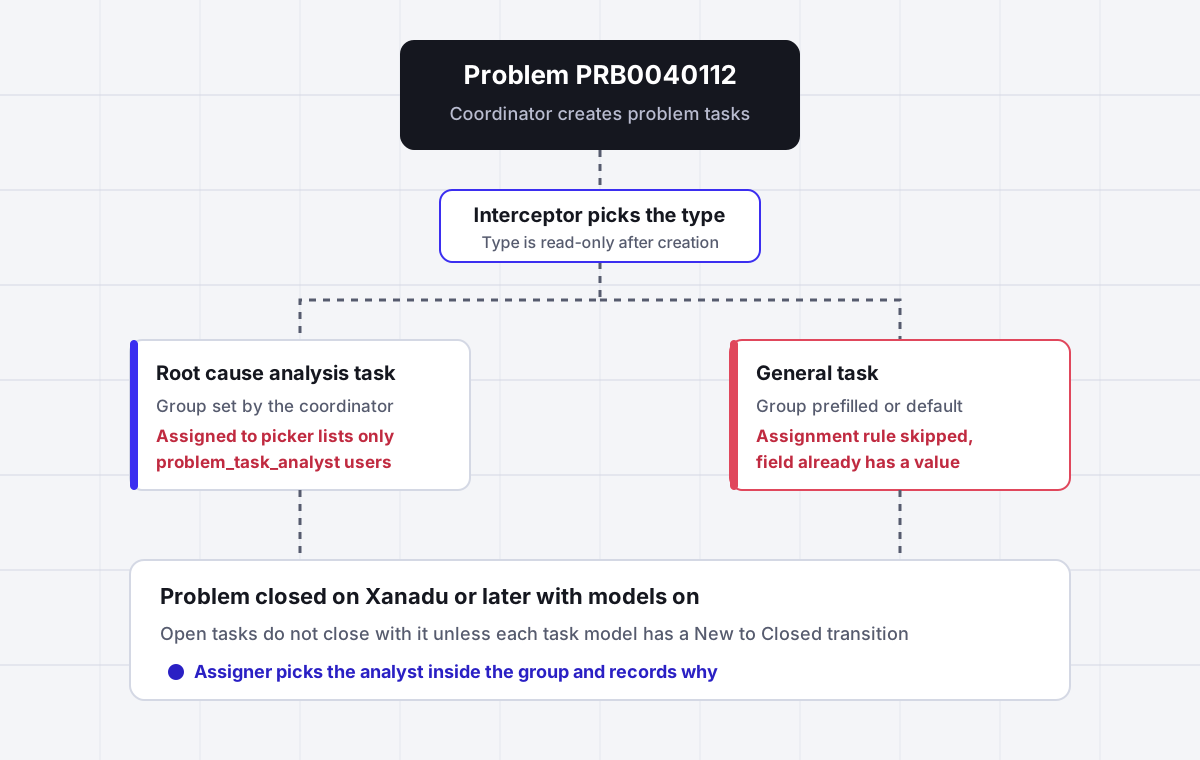
A ServiceNow problem task (table problem_task, numbered PTASK) is a unit of work a problem coordinator creates under a problem and assigns to a group or a person. Two types ship out of the box, Root cause analysis and General, chosen on an interceptor screen and read-only afterwards. The Assigned to field only lists users holding the problem_task_analyst role, assignment rules never overwrite a group that is already set, and on Xanadu or later with problem models, closing the problem no longer closes its tasks. ServiceNow picks a team at best. Assigner picks the analyst inside that team by availability and load, and records why.
Why it fits
This page is for a ServiceNow problem manager, problem coordinator or ITSM admin whose problem tasks arrive without the right owner, cannot be assigned to the engineer who should do them, or stay open after the problem is closed.
The Assigned to picker hides most of the team
On problem tasks the Assigned to reference is filtered to users with the problem_task_analyst role. The itil role is not enough, so an engineer who works incidents all day is invisible in the picker. Scripts and the API can still set them, which is why the same user appears on some tasks and not others.
Closing the problem leaves tasks open
ServiceNow support article KB2178948 says that after the Xanadu or Yokohama upgrades, problem tasks may remain open after the parent problem is closed. The cause is problem models. Each task model needs its own transition to Closed, or the tasks sit in New or Work in Progress with nobody watching.
Assignment rules never replace a value
Assignment rules and assignment data lookup rules run only when the group and the assignee are both empty. A default value, a template or a copied group takes the task out of reach of every rule, and nothing records that the rule was skipped.
A new task type needs two changes
Adding a choice to the problem task type field does nothing on its own. The interceptor that asks which type to create needs a new active answer as well, and a custom problem task model stays hidden until an admin creates its interceptor entry.
Two state models, and scripts written for the other one
Instances from before Madrid use Open, Work in Progress and three Closed states. Newer ones use New, Assess, Work in Progress and Closed. Community scripts that block a problem from closing still test the old values, which on a newer instance treat every task as open.
A group is still not an owner
Every native mechanism stops at the assignment group. Inside the group, the task waits until someone claims it, so the analyst who clicks first gets the interesting root cause work and the one with the most room gets nothing.
Side by side
How a ServiceNow problem task gets an owner, and where each path leaks
| Method | What it sets | When it runs | Leaks when | Picks a person |
|---|---|---|---|---|
| Coordinator creates the task by hand | Type, group and assignee chosen on the form | When the problem needs help | The right engineer lacks problem_task_analyst and is not in the picker | Only by hand |
| Assignment rule | Assignment group or a fixed user from conditions | On save, only when group and assignee are empty | Any default, template or copy set a group first | Only a fixed user |
| Assignment data lookup rule | Group from a matching lookup row | Only when the group is empty | Same as assignment rules, a prefilled group skips it | No |
| Business rule or flow on insert | Group copied from the problem or looked up | On insert of each problem task | The problem has no group yet, or its group changes later | No |
| Problem task model | States and transitions for the task type | Throughout the task lifecycle | No transition to Closed, so tasks stay open after the problem closes | No |
| Advanced Work Assignment | Work item offered to an available agent | Only with a custom service channel on problem_task | Problem tasks are not an out of box AWA channel | Yes, once built |
Sources: ServiceNow product documentation for problem tasks, problem task models and assignment rules (current release), ServiceNow support articles KB2178948, KB0952501 and KB0998861, and answers in the ServiceNow Community ITSM and developer forums. Behavior can differ where flows, dictionary overrides or business rules have been customized.
In detail
How problem task assignment really works in ServiceNow, and what admins end up building
What a ServiceNow problem task is and who creates it
The documentation describes the job in one line: if a problem coordinator requires help to resolve a problem, the coordinator can create and assign problem tasks to assignment groups or users to complete those activities. A problem task lives in the problem_task table, extends task, and gets a PTASK number. It carries its own Assignment group and Assigned to fields, its own state, and a Close code that is read-only and only records whether the task was completed or canceled.
Creating one is quick. Open the problem, go to the Problem Tasks related list, select New, pick a type, fill in the form and submit. The roles that can do it are listed in the docs as itil, sn_problem_write, admin, problem_admin, problem_coordinator, problem_manager or problem_task_analyst. That list matters later, because the list of people who can create a task is much wider than the list of people who can be picked to own one.
In practice problem tasks fall into three kinds of work: a root cause investigation handed to the team that owns the failing service, a workaround or knowledge article for the service desk, and a permanent fix that usually becomes a change request. Each one belongs to a different group, which is why a single problem can fan out to four or five PTASKs and why assignment is where problem management usually stalls.
ServiceNow problem task types and the interceptor
Two types ship out of the box. Root cause analysis is for when you need to investigate the root cause and the resolution for a problem. General is for any other task. When a user selects New, an interceptor screen asks which of the two to create, and the answer is stored in a Type field that the form documentation describes as read-only. A task created with the wrong type cannot be corrected on the form. It has to be canceled and recreated.
Adding your own type, for example Workaround or Vendor escalation, takes two steps that are easy to half finish. You add the choice on the problem task type field, and you add a new active answer on the problem task interceptor. A Community thread from an admin who did only the first step ends with the note that you still need the choice list, but the option never appeared until the interceptor answer existed. There is no Active checkbox on the interceptor itself. It runs when it points at problem_task.do and its answers are active.
On instances with problem models turned on, the same pattern applies to task models. The documentation for creating a problem task model has you define states and transitions in prb_task_model and then create an interceptor entry whose target URL is problem_task.do?sys_id=-1&sysparm_query=prb_task_model= followed by the model sys_id. Skip the interceptor and the model exists but nobody can create a task with it.
ServiceNow problem task states and the two state models
Which states you see depends on when your instance was provisioned. The form documentation says it directly: existing customers see Pending, Open, Work in Progress, Closed Complete, Closed Incomplete and Closed Skipped. New customers from Madrid onward get the state management process, where State is read-only and the states are New, Assess, Work in Progress and Closed. That newer model comes from the Problem Management Best Practice Madrid State Model plugin, which only ships on new instances.
In the newer model a task moves from New to Assess through an Assess dialog, whose fields are an admin editable form view called PTASK Assess Dialog View. Start Work moves it to Work in Progress, Re-assess sends it back to Assess, and Cancel closes it with a canceled close code. The roles that can drive these transitions are problem_admin, problem_coordinator, problem_manager, problem_task_analyst and admin.
The trap is in the numbers. Community code for the newer model filters open tasks with state values 151, 152 and 154 for New, Assess and Work in Progress. The legacy model used 1 for Open, 2 for Work in Progress, and 3, 4 and 7 for the three closed states. Accepted 2025 answers for blocking a problem from closing while tasks are open still test state != 3. Copied onto a newer instance, that check treats every task as open, or never recognizes a closed one. Check which model your instance runs before you paste anything.
Why the right analyst is missing from the Assigned to picker
This is the complaint that brings most admins to problem task assignment. The coordinator selects a group, opens the Assigned to lookup, and the engineer who should do the root cause work is not there. The reason is a dictionary override on the reference qualifier. On the problem table, Assigned to is filtered to users with problem_coordinator. On the problem task table it is filtered to users with problem_task_analyst. Holding itil does not help.
Two details make this confusing. First, the filter only applies to the lookup on the form. Scripts, flows and the API can put any user into Assigned to, so some tasks show an owner nobody could have picked by hand. Second, the dependent lookup that limits Assigned to by group reads the Group Member table, sys_user_grmember, and ServiceNow support article KB0998861 notes it only works when the dependent field has group in its name. ServiceNow describes the same failure on other tables in KB0952501: when the qualifier asks for a role that no member of the group holds, nobody from that group can be selected, and the fix is to change the qualifier or grant the role.
The usual fixes are granting problem_task_analyst to every engineer who may receive problem work, or adding it to a role they already hold. Both are license questions as much as configuration ones, so check with whoever owns your ServiceNow contract before widening a role. Editing the qualifier is the third option, and the one most often advised against in the Community.
Why assignment rules skip problem tasks
Assignment rules under System Policy, Rules, Assignment apply to tables that extend task, so a rule can be written for problem_task even though the documentation example for problem management only covers the problem table. The limit is the one that applies everywhere. A ServiceNow employee put it plainly in the Community: the task record must be unassigned, it cannot have an existing value for either the assigned to or the assignment group field, and assignment rules cannot overwrite existing assignments, including assignments set by a default value or a previously run assignment rule.
Assignment data lookup rules behave the same way. They only run when the group is empty. So if anything on your instance puts a value in the group before the rule runs, a default on the field, a task template, a flow that copies the group from the problem, the rule never fires and nothing logs that it was skipped. The documentation does not describe any automatic copy of the group from the parent problem, and Community reports differ: one admin saw the group populated from the problem when testing by hand but empty when the same task was created by an automated test. Treat that as something to check on your own instance, not an assumption.
The pattern most teams settle on is a single insert business rule or flow: when a problem task is created with an empty group, set the group from a lookup on type and configuration item, and fall back to the problem group if nothing matches. It is predictable, it is easy to report on, and it avoids three mechanisms fighting over one field.
Problem tasks that stay open after the problem closes
ServiceNow support article KB2178948 describes a change many teams only notice in an audit. In Washington and earlier, closing a problem closed its tasks. After the Xanadu or Yokohama upgrades that no longer happens automatically, and problem tasks may remain open, in New, In Progress or On Hold, after the parent problem has been closed. The cause is problem models, introduced in Xanadu, which drive the problem and task lifecycles through state transition conditions.
The fix is per model. Each problem task model needs a transition from its open states to Closed, and the KB is specific that it must be the exact model chosen when the task was created. Fixing the Root cause analysis model does nothing for tasks created under General. On older lifecycles the property problem.closed.cancel_open_tasks, true by default, canceled open tasks when the problem closed. It does not cover instances where models are on. Models are enabled by default for new customers from Yokohama, and upgraded instances turn them on with com.snc.problem_management.models.enabled, so two instances in the same company can behave differently.
The opposite control does not exist out of the box either. Nothing stops a coordinator from closing a problem while tasks are still open. Every answer in the Community thread asking for that is a custom before update business rule with an abort action, which brings you back to the state value trap above.
Where Assigner fits beside ServiceNow problem management, and where it does not
If your problem practice is small, one or two coordinators and a handful of problems a month, native assignment is enough. Grant problem_task_analyst to the engineers who take problem work, write one insert rule that sets the group, add a transition to Closed on each task model, and schedule a report of open problem tasks whose problem is closed. That covers most of what goes wrong.
The gap opens when problem tasks become regular work for several teams. ServiceNow decides which group owns a task and then stops. Inside the group, root cause tasks go to whoever claims them, and problem tasks are not an out of box channel for Advanced Work Assignment, which only covers child tables of task or interaction through a custom service channel you build and license. Assigner sits beside ServiceNow and picks the analyst: round robin or load based inside the group, skipping people who are out or at capacity, matching skills such as database or network where you define them, and writing the reason on every assignment. ServiceNow stays the system of record for the problem, the task and its states.
It is priced per person who receives work, from $7 per user per month billed yearly, so a problem team of 12 analysts is priced on 12 seats, not on everyone who can raise a problem.
Questions buyers ask
Frequently asked questions
What is a problem task in ServiceNow?
A problem task is a record in the problem_task table, numbered PTASK, that a problem coordinator creates under a problem to hand a piece of work to a group or a person. Out of the box it is either a Root cause analysis task or a General task, and it has its own group, assignee, state and close code.
What are the problem task types in ServiceNow?
Two types ship out of the box. Root cause analysis is for investigating the cause and resolution of a problem. General is for any other task. The type is picked on an interceptor screen when the task is created and is read-only on the form afterwards.
How to create a problem task in ServiceNow?
Open the problem, go to the Problem Tasks related list and select New. Choose Root Cause Analysis or General on the interceptor, fill in the short description, assignment group and assignee, and submit. The roles that can do this include itil, sn_problem_write, problem_coordinator, problem_manager and problem_task_analyst.
What are the problem task states in ServiceNow?
Instances provisioned from Madrid onward use New, Assess, Work in Progress and Closed, with State read-only on the form. Older instances use Pending, Open, Work in Progress, Closed Complete, Closed Incomplete and Closed Skipped. Check which model your instance runs before copying scripts that test state values.
What is the problem task table name in ServiceNow?
The table is problem_task. It extends the task table, so it inherits Assignment group, Assigned to and the other task fields, and assignment rules can be written against it. Problem task models are stored in prb_task_model.
What does the problem task analyst role do?
The problem_task_analyst role works on a problem task and manages it through its life cycle. On most instances the Assigned to field on a problem task is filtered to users with this role, so an engineer without it cannot be picked as the owner from the form.
Why can I not assign a problem task to a user in the group?
Because the Assigned to reference on problem_task is usually filtered to users holding problem_task_analyst. Having itil or being a member of the group is not enough. Grant the role to the people who take problem work, or review the reference qualifier, bearing in mind the license impact.
What is the problem task interceptor in ServiceNow?
It is the screen that asks which type of problem task to create when a user selects New. It points at problem_task.do, and each option is an interceptor answer. A new type or a custom task model only appears once a matching active answer exists.
Why do problem tasks stay open after the problem is closed?
Since the Xanadu and Yokohama releases, problem models drive the lifecycle, and closing a problem no longer closes its tasks automatically. Add a transition to Closed on each problem task model, the exact model used when the task was created, as described in ServiceNow support article KB2178948.
Do assignment rules work on problem tasks?
They can, because problem_task extends task. They only fire when both the assignment group and the assignee are empty, and they never overwrite a value set by a default, template or earlier rule. If your tasks arrive with a group already set, the rule is skipped silently.
Is there an out of box SLA for problem tasks?
No out of box SLA definition for problem_task turned up in the documentation or Community. Teams that need one create a separate SLA definition on the problem_task table, usually keyed to priority and type, next to any SLA on the parent problem.
Can ServiceNow round robin problem tasks within a group?
Not natively. Assignment rules set a fixed group or user, and problem tasks are not an out of box Advanced Work Assignment channel, so rotation needs a custom channel or a routing layer. Assigner picks the analyst inside the group by availability and load and records why.
What does problem task routing software cost?
Assigner is $7 per user per month billed yearly on Starter, or $15 billed monthly, with plans from 5 users. You count the analysts who receive problem tasks, not everyone who can raise a problem, and ServiceNow stays the system of record.
Keep reading
Related ServiceNow routing pages worth reading next:
- ServiceNow change task assignment - The permanent fix usually becomes a change, and its tasks arrive without a group too.
- ServiceNow assignment rules - Order, conditions and the empty field rule behind every skipped assignment.
- ServiceNow group roles - How roles cascade through groups, and why membership alone does not grant problem_task_analyst.
- ServiceNow catalog task assignment - The same empty group problem on SCTASK records.
- ServiceNow round robin - Why native rules have no rotation, and what Advanced Work Assignment actually does.
- ServiceNow assignment rules not working - A checklist for rules that match but never fire.
Stop hand-sorting your incoming work
Let Assigner route it to the right available person by skill, workload, and availability, using rules you control. Nothing sits unassigned and no one gets cherry-picked. Every assignment shows why.