ServiceNow Assignment Lookup Rules and Assignment Data Lookup Rules Versus Assignment Rules
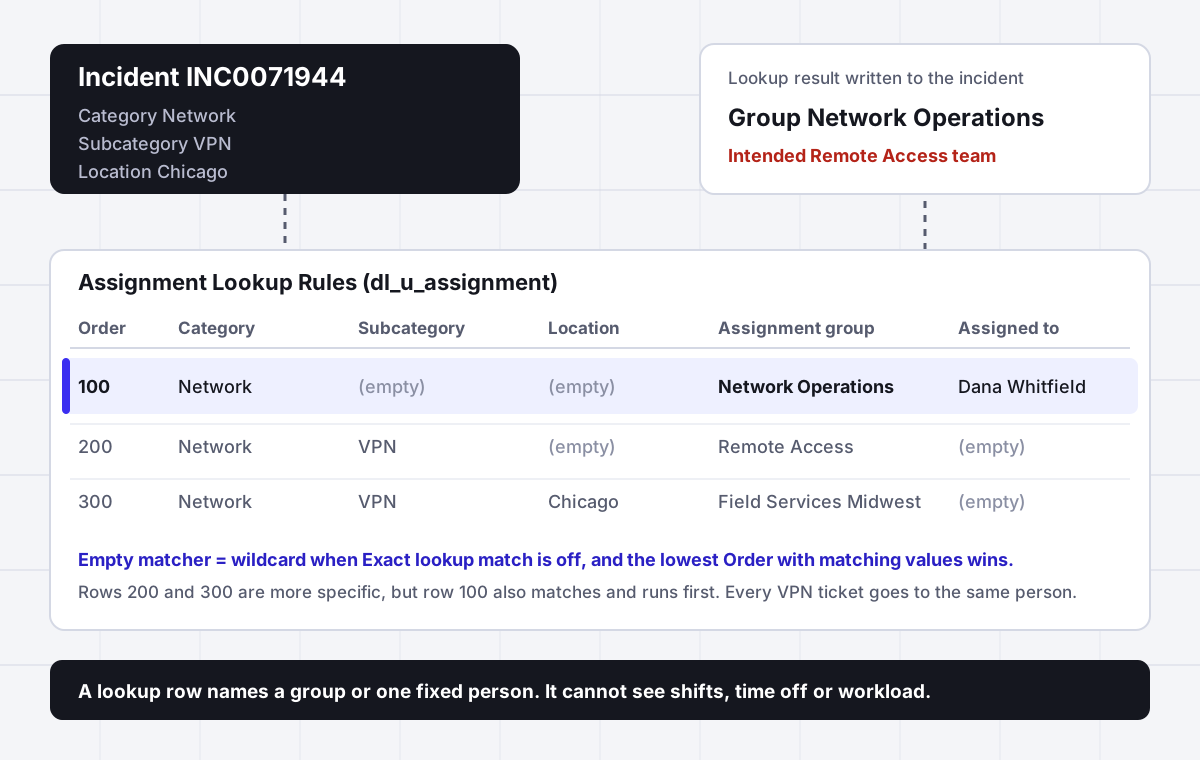
The lookup table started with twelve rows. Three reorganizations later it has four hundred, nobody remembers why row 100 exists, and VPN tickets keep landing on Network Operations even though a row for VPN and Remote Access was added in spring. Nothing is broken. The table is doing exactly what it was told, in an order nobody wrote down.
In short
ServiceNow assignment lookup rules are rows in the Assignment Lookup Rules table (dl_u_assignment) that set Assignment group and Assigned to on an incident when its Category, Subcategory, Configuration item or Location match. They live under System Policy, Rules, Assignment Lookup Rules, need the admin or assignment_rule_admin role, and every row needs at least one matcher and one setter. When several rows match, the rule with the lowest order wins. Unlike assignment rules, which run when the record is saved and only fill an empty group, lookup rules can run on form change, so the agent sees the group before saving.
Why it fits
This page is for a ServiceNow admin, ITSM process owner or service desk manager who maintains assignment lookup rules, has watched tickets land on the wrong team or always on the same named person, and needs routing that sets the right group and then the right available person without another two hundred rows.
A table, not a script
Each row in dl_u_assignment pairs matcher values (Category, Subcategory, Configuration item, Location) with setter values (Assignment group, Assigned to). The Data Lookup plugin reads the table, so admins maintain routing as data rather than code.
Lowest order wins
ServiceNow documentation states that the Data Lookup plugin runs the rule with the lowest order and matching values. A broad row with a low order quietly beats every specific row below it.
Empty can mean anything
When Exact lookup match is cleared on the definition, an empty matcher acts as a wildcard. A row with only Category filled matches every subcategory, location and CI in that category.
Always replace cuts both ways
With it cleared, the lookup does nothing once the field has a value, including a default or a template value. With it selected, the lookup can put back a group an agent just changed by hand.
Visible before the save
Lookup rules can run on form change, so the group appears while the agent is still on the form. Assignment rules run once the record is saved and only fill an empty field.
It never sees who is free
A row names a group or one fixed person. It cannot check shifts, time off or open workload. Assigner picks the person inside the group by skill, load and availability and records why.
Side by side
Assignment lookup rules, assignment rules and Assigner compared
| Question | Assignment lookup rules | Assignment rules | Assigner beside ServiceNow |
|---|---|---|---|
| Where it is configured | System Policy, Rules, Assignment Lookup Rules (dl_u_assignment) | System Policy, Rules, Assignment (sysrule_assignment) | Routing rules you own in Assigner, written back to the record |
| What it matches on | Exact values in Category, Subcategory, Configuration item, Location | A condition on the record, or a script | Any field, plus skills, team and work type |
| When it runs | On form change, insert or update, as set on the definition | When the record is saved | When work arrives or changes state |
| Visible to the agent before saving | Yes, with Run on form change | No | Owner and reason shown on the record after the pick |
| Existing value in the field | Kept, unless Always replace is selected | Kept, the rule only fills an empty field | Respected or reassigned by your rule, with the reason logged |
| Several rules match | Lowest order with matching values wins | Lowest order wins | Rules evaluated in your order, decision recorded |
| Chooses a person by availability or load | No, Assigned to is a fixed name | No, Assigned to is a fixed name | Yes, round robin, load caps, shifts and time off |
| Explains each assignment | No | No | Yes, every assignment carries its reason |
Sources: ServiceNow documentation pages Create an assignment data lookup rule, Data lookup rules, Create custom data lookups and Precedence between data lookup, assignment, and business rules, plus the Community threads Difference between Assignment rule and Data lookup (accepted answer by Michael Fry, replies by a ServiceNow employee and by Les1) and Report on Assignment Lookup rules and subcategories (April 2025), read October 2026. Check the definition record in your own instance before relying on any default.
In detail
How ServiceNow assignment lookup rules work and where they break
What are assignment lookup rules in ServiceNow
Assignment lookup rules are the no code way to set the Assignment group and Assigned to fields on an incident from a table of values. You open All, System Policy, Rules, Assignment Lookup Rules, select New, and fill in a row. The role you need is assignment_rule_admin or admin.
Each row has two kinds of fields. Matcher fields are what the incident is compared against: Category, Subcategory, Configuration item and Location. Setter fields are what gets written when the row matches: Assignment group and Assigned to. The documentation is plain about the minimum, a valid rule needs at least one matcher field and one setter field. The example in the docs sends incidents with Category Inquiry/Help and Subcategory Email to one named person.
Every row also has Active and Order. Order is the field that decides most outcomes, and it is covered below.
Behind the module sits a table, dl_u_assignment, and a data lookup definition that tells the platform when to read it. That is why these rules are also called assignment data lookup rules. They are one use of the general Data Lookup feature, which can set any field (priority from impact and urgency is the other built in example), not only assignment fields.
Assignment rules vs assignment lookup rules
The two features sit next to each other in the System Policy menu and both set a group, so teams often run both and then cannot tell which one acted. The differences that matter in practice:
- Timing. The accepted Community answer puts it in one line, lookup rules run onChange when the lookup values match the rule, while assignment rules run at insert or update. A ServiceNow employee in the same thread added that data lookup rules can be defined to run in the client and on insert or update, and that assignment rules run once the record is saved, so you only see the group after the save.
- Matching. A lookup row needs exact values. An assignment rule uses a condition and can run a script, which is why it handles anything that is not a clean field value.
- Existing values. An assignment rule only fills an empty field. A lookup rule can replace an existing value when its definition says Always replace.
- Order between them. The documented execution order lists assignment rules and data lookup in the same engine step, after before business rules with an order under 1000 and before the database write. The docs do not rank one above the other inside that step, and they note that the system ignores duplicate rules once an incident has been assigned unless the data lookup option to replace existing values is used.
The practical rule follows from that. Pick one mechanism to set the group for a given kind of ticket. Running both on the same categories gives you a result that depends on which field was already filled, and nobody can predict it from the configuration screens.
Why the wrong lookup rule wins
The documentation on the Order field reads, word for word, that the Data Lookup Plugin runs the rule with the lowest order and matching values. It does not pick the most specific row. It picks the first row, by order, whose matchers fit.
Add how empty matchers behave and you have the most common lookup bug. On a data lookup definition, the Exact lookup match setting decides what an empty matcher means. When it is selected, the matcher table must have a row for every combination, including empty values, or the lookup fails. When it is cleared, empty matcher values act as wildcards and match any value on the record.
So with wildcards on, a row at order 100 that says Category Network, everything else empty, Network Operations, also matches a VPN ticket from Chicago. The row at order 200 for Network and VPN, and the row at 300 for Network, VPN and Chicago, never get a turn. The fix is boring and reliable:
- Give specific rows the lowest numbers and broad rows the highest. Leave gaps of 100 so you can insert rows later.
- Sort the module list by Order and read it top down as the platform does.
- When a ticket lands wrong, filter the table on its Category and read every active row that could match, in order, before touching anything.
Always replace and the group agents cannot change
Setter fields carry an option called Always replace. The custom data lookup documentation describes it simply, when selected it replaces existing values, and when cleared the update is ignored if the field already has a value. Both settings produce a familiar complaint.
Cleared. The lookup appears to do nothing on some tickets. The cause is usually a value that arrived first: a default on the form, a record producer or template that sets a group, an integration that sends one, or a mandatory Assignment group field the agent filled before choosing the category. The lookup sees a value and steps aside.
Selected. The lookup wins every time, including against people. A Kilo Sage in the long running Community thread described the result directly, one is not able to override the lookup rule. An agent who moves a ticket to the right team by hand sees it snap back when the category still points elsewhere, because the rule runs again on the change or on update.
Decide it per setter, not per habit. A common pattern is Always replace on Assignment group only while the category is being chosen on a new record, and an assignment group that agents can change freely after that, which usually means a lookup that runs on form change and insert but not on update.
Finding subcategories with no lookup rule
A lookup table only covers the combinations someone thought to add. A new subcategory with no row creates incidents with no group, and they sit in the unassigned list until someone notices. An admin asked exactly this in April 2025: how to report which incident subcategories have no assignment lookup rule, because a database view returned thousands of records.
The accepted answer was a background script that loops through the subcategory choices and checks dl_u_assignment for each one. A version of the same idea:
var ch = new GlideRecord("sys_choice");
ch.addQuery("name", "incident");
ch.addQuery("element", "subcategory");
ch.addQuery("inactive", false);
ch.query();
while (ch.next()) {
  var rule = new GlideRecord("dl_u_assignment");
  rule.addQuery("subcategory", ch.getValue("value"));
  rule.addQuery("active", true);
  rule.setLimit(1);
  rule.query();
  if (!rule.hasNext()) {
    gs.info("No lookup rule for " + ch.getValue("label") + " (" + ch.getValue("value") + ")");
  }
}
Run it in a sub production instance first and read the log. Pair it with a standing report on incidents created in the last seven days with an empty Assignment group, grouped by subcategory. The report tells you where tickets are falling through. The script tells you why.
Lookup rules on tables other than incident
The assignment lookup module is described for incidents, and its setter fields say so: the group and the user to assign the incident to. Data lookup definitions are not inherited by extension tables, so a definition on one table does nothing on another. For problem, change, catalog tasks or a custom table, you build a custom data lookup.
The documented steps: create a table that extends Data Lookup Matcher Rules [dl_matcher], with a name starting u_; add matcher and setter columns, for example a reference to Group for the assignment group; add rows, each one unique; then create a definition under System Policy, Rules, Data Lookup Definitions with Source Table, Matcher Table, Active and the three run options, and add Matcher Field Definitions and Setter Field Definitions. Lookups only run on fields with matcher definitions, and journal fields do not work with data lookup. All of it needs the admin role.
That is a reasonable amount of work for one table. It is a lot of work for five, and each table carries its own order and wildcard behavior to keep straight.
The Assigned to setter is one fixed person
Lookup rows can fill Assigned to, and the docs example does exactly that. In a small team it feels efficient. In practice a named person in a lookup row receives every matching ticket whether they are on shift, on leave or already holding thirty open incidents. Nothing in the row can see any of that.
Teams find out in one of three ways: a backlog under one name while colleagues sit idle, tickets assigned to someone who left the company, or a reassignment count that climbs because the named person passes work on. Most admins end up clearing Assigned to from every row and leaving the person to the group to sort out, which moves the problem into a queue that people pick from by hand.
The split that works is to let the lookup or an assignment rule choose the group, because category to team is stable data, and to choose the person with something that can see live availability and load.
How Assigner works with assignment lookup rules
Assigner is task assignment software that sits beside ServiceNow and decides who takes each incident, case or request. Your instance stays the system of record and your lookup table can stay where it is.
- Keep the lookup for the group. Category, subcategory and location to team is what the table is good at. Assigner reads the group it set.
- Assigner picks the person. Round robin, capacity caps, load balanced and priority routing, with shifts and time off taking people out of the pool, so nobody receives work they cannot start.
- Every assignment has a reason. The record shows which rule matched and why that person was chosen, which is the question a lookup table can never answer.
- Rules you own, no table bloat. Skill and team rules replace the long tail of rows that exist only to name a person.
Plans start at $7 per user per month billed yearly ($15 billed monthly), with a 5 user minimum. You can run the demo on sample tickets and see the reason recorded on each assignment, or compare plans.
Questions buyers ask
Frequently asked questions
What are assignment lookup rules in ServiceNow?
They are rows in the Assignment Lookup Rules table (dl_u_assignment) that set Assignment group and Assigned to on an incident when its Category, Subcategory, Configuration item or Location match the row. They are a built in use of the Data Lookup feature and are maintained as data, without scripting.
Where are assignment lookup rules in ServiceNow?
Navigate to All, System Policy, Rules, Assignment Lookup Rules. The same Rules section holds Data Lookup Definitions and the Assignment module for assignment rules. Creating or editing a lookup rule needs the admin or assignment_rule_admin role.
What are assignment data lookup rules?
It is another name for the same feature. Assignment lookup rules are data lookup rules whose matcher table is dl_u_assignment and whose setter fields are Assignment group and Assigned to. A data lookup definition controls whether they run on form change, on insert or on update.
What is the difference between assignment rules and assignment lookup rules?
Lookup rules match exact field values from a table and can run on form change, so the group shows before saving. Assignment rules use a condition or script, run when the record is saved, and only fill an empty field. Lookup rules can replace an existing value when Always replace is selected.
Which runs first, data lookup rules or assignment rules?
ServiceNow documents both in the same engine step, after before business rules ordered under 1000 and before the database write, without ranking one above the other. The docs add that duplicate rules are ignored once the incident is assigned unless the data lookup replace option is used. Use one mechanism per ticket type.
Why is my assignment lookup rule not working?
The usual causes are a lower order row that also matches, often a broad row with empty matchers acting as wildcards, a field that already had a value while Always replace is cleared, an inactive row, or a definition with Run on insert or update turned off. Sort the table by Order and read it top down.
Which lookup rule wins when several rows match?
The rule with the lowest order and matching values. ServiceNow documentation states that the Data Lookup Plugin runs that rule. It does not choose the most specific row, so specific rows need lower order numbers than broad ones.
Can an assignment lookup rule assign to a specific person?
Yes. Assigned to is a setter field and the documentation example assigns incidents directly to one user. The rule cannot check whether that person is working or how much they hold, so most teams set only the group and choose the person another way.
Do assignment lookup rules work on tables other than incident?
The built in module targets incidents, and data lookup definitions are not inherited by extension tables. For other tables you create a custom matcher table extending dl_matcher and a data lookup definition for that source table, which needs the admin role.
What does Always replace do on a data lookup setter?
When selected, the lookup replaces whatever value the field already has. When cleared, the lookup is ignored if the field already has a value, including a default or template value. Selected on the group field can stop agents from changing the group by hand.
How do I find subcategories without an assignment lookup rule?
Loop through the incident subcategory choices in sys_choice and query dl_u_assignment for each value with a limit of one, logging every value with no row. Run it in a sub production instance, and keep a report of new incidents with an empty Assignment group grouped by subcategory.
What are matching rules in ServiceNow?
Matching rules are a separate feature used by HR Service Delivery and Customer Service Management to pick an agent, for example by skills and country, after assignment rules choose a group. They are not the same as assignment lookup rules, which only read the dl_u_assignment table.
How much does Assigner cost for a ServiceNow service desk?
Starter is $7 per user per month billed yearly with round robin, capacity caps and availability skip. Team is $18 and adds load balanced and priority routing. Business is $36 with multiple teams, territory rules and weighted round robin. Each plan has a 5 user minimum.
Keep reading
More pages on ServiceNow assignment:
- ServiceNow assignment rules - Conditions, scripts and why a rule only fills an empty field.
- ServiceNow assignment rules execution order - Where rules, data lookup and business rules sit in the save.
- ServiceNow assignment rules not working - The checks to run when a rule never fires.
- Auto populate the assignment group - Setting the group from the CI, the caller or the category.
- ServiceNow reassignment count - Measuring the bounces a wrong first group causes.
- ServiceNow HR case assignment - Assignment rules and matching rules in HR Service Delivery.
- ServiceNow round robin - Rotating work inside a group without a fixed name.
Stop hand-sorting your incoming work
Let Assigner route it to the right available person by skill, workload, and availability, using rules you control. Nothing sits unassigned and no one gets cherry-picked. Every assignment shows why.