ServiceNow Reassignment Count Field, Report, and How to Reduce Incident Reassignments
The monthly service review opens with one slide: 23 percent of incidents were reassigned three times or more. The network lead says half of those were never theirs. The service desk lead says the counter is wrong because tickets show 1 before anyone has moved them. Both are partly right, and until you know exactly what the field counts, nobody can fix the routing behind the number.
In short
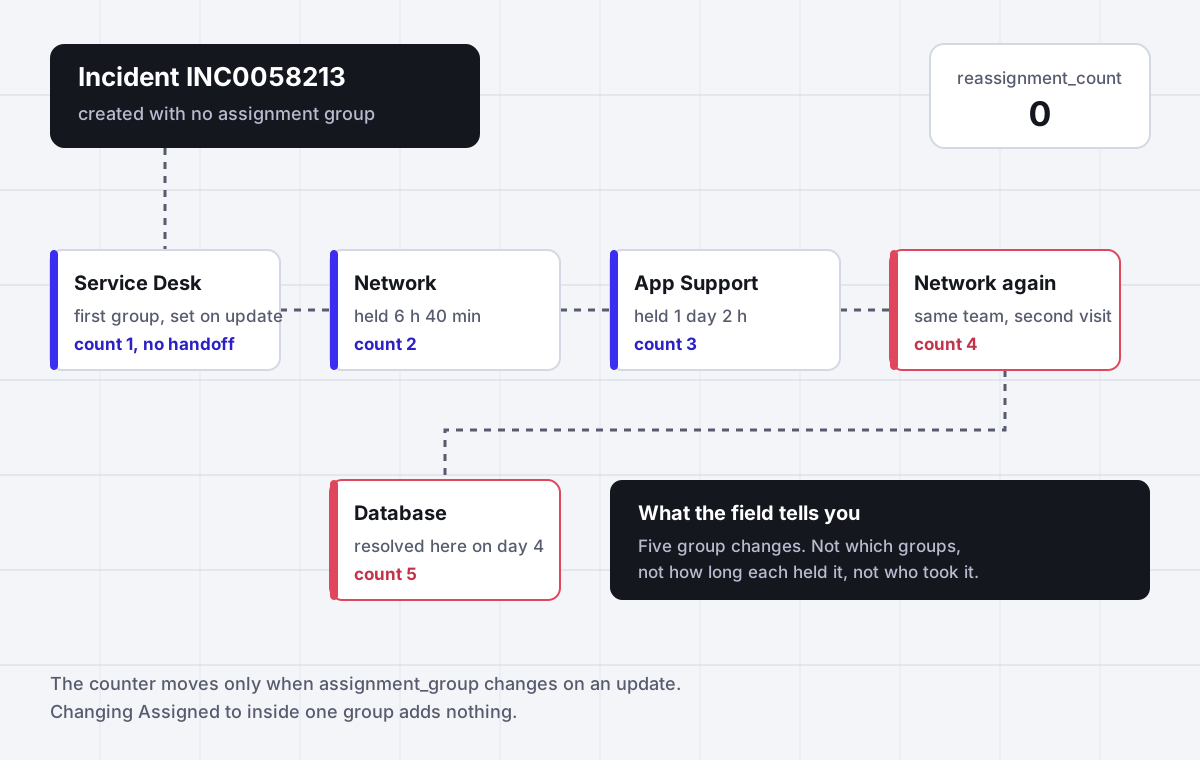
ServiceNow reassignment count is an integer field (reassignment_count) on the task table, so incidents, cases, HR cases and catalog tasks all carry it. A business rule named reassignment counter adds 1 every time the Assignment group changes on an update. It ignores changes to Assigned to, it counts the first group as a reassignment when the record was created without one, and it double counts when a script calls current.update(). To report on it, filter on the field for a quick list and use metric instances for which groups held the ticket and for how long. To lower it, fix first assignment.
Why it fits
This page is for an ITSM process owner, service desk manager or ServiceNow admin who has a reassignment KPI in the monthly review, does not fully trust the number, and needs to both report it correctly and bring it down by getting incidents and cases to the right group and person the first time.
One business rule does the counting
The rule is called reassignment counter, it sits on the task table, and its whole logic is a condition, current.assignment_group.changes(), and one line, current.reassignment_count += 1. It runs on updates only.
A count of 1 can mean zero bounces
When a record is inserted with an empty Assignment group and someone fills it in afterwards, that first assignment is an update, so the counter goes to 1. Records created with a group, or given one by an assignment rule, start at 0.
Jumps of 2 come from current.update()
Two separate community threads traced a counter that rose by 2 for one group change to a script calling current.update(), once in a custom Save button and once in a business rule after an integration call. The second save fires the counter again.
Person changes are invisible
The condition only watches assignment_group. A ticket passed between six people inside one group still shows 0, so the field understates the handoffs your agents and customers actually feel.
The number has no names in it
A count of 5 looks the same whether a ticket toured five teams or bounced between two. Finding the group that causes the bounces needs metric instances on assignment_group, not the counter.
The fix is the first assignment
Almost every reassignment is a first assignment that was wrong, or a group where nobody available could do the work. Assigner picks the first owner by skill, load and availability and records why, so bounces drop at the source.
Side by side
What moves the ServiceNow reassignment count, and what does not
| Event on the record | Counter change | Why | What to do about it |
|---|---|---|---|
| Created with an Assignment group already set | Stays 0 | The rule runs on updates only, not on insert | Nothing, this is the clean baseline |
| Assignment rule fills the group on insert | Stays 0 | The group is present when the record is first saved | Prefer rules that run at creation |
| Created blank, group filled in later | Goes to 1 | Blank to a value is a change on an update | Add a previous group check to the condition, or report on counts above 1 |
| Group A changed to group B | Plus 1 | This is the event the field exists for | Trend it per first group |
| Assigned to changed inside the same group | No change | The condition watches assignment_group only | Track person handoffs with a metric on assigned_to |
| Script calls current.update() during the save | Plus 2 for one change | The second update fires the counter rule again | Remove current.update() from before rules, use setWorkflow(false) in after rules |
| Group changed back to a team that already held it | Plus 1 | The rule has no memory of earlier groups | Use metric instances to see ping pong between two teams |
Sources: ServiceNow Community threads Can someone explain the reassignment counter (accepted answer quoting the rule), Incident reassignment count is incorrect (accepted solution), Reassignment counter increased by 2 for single change in assignment group (October and November 2025), and Report for reassignment count incident (August 2026), read October 2026. Instances differ once customized, so open the business rule in your own instance before you rely on any of this.
In detail
How the ServiceNow reassignment count field works and how to bring it down
What is reassignment count in ServiceNow
Reassignment count is a whole number stored in the reassignment_count column of the task table. Because incident, problem, change request, catalog task, customer service case and HR case all extend task, every one of those records has the field, whether or not it is on the form. It is meant to answer one question: how many times did this piece of work move between assignment groups before it was finished.
The value is not calculated when you open a report. It is written by an out of the box business rule called reassignment counter. The accepted answer in the long running Community thread on the subject quotes it in full. The rule lives on the task table, it is triggered by updates only, its condition is current.assignment_group.changes() and its script is one line:
current.reassignment_count += 1;Everything odd about the number follows from those two lines. The rule has no idea whether the change was a real handoff, a correction of a typo, an integration writing the same group twice, or the very first time anyone chose a group. It sees the field change on an update and adds one.
If the field is missing from your incident form, that is a form layout matter, not a missing feature. Add it through Configure, Form Layout, or personalize a list and add the Reassignment count column. Most teams keep it read only so the number cannot be edited by hand.
Why the count shows 1 after the first assignment
This is the complaint that starts most arguments about the KPI. A ticket that was assigned exactly once shows a reassignment count of 1, so a report filtered on count greater than 0 claims that nearly everything was reassigned.
The Community explanation is precise. If the incident is inserted with no assignment group, populating the group for the first time gives a count of 1. If the incident is created with a group, or an assignment rule provides one at creation, the count is 0. The rule only fires on updates, and blank to Service Desk is a change on an update.
So the same team can produce two different baselines depending on the intake channel:
- Portal and catalog records usually get a group from an assignment rule or a flow at insert and start at 0.
- Email, phone and walk up records are often saved blank and assigned a minute later by the service desk, so they start at 1.
- Incidents created from an Interaction show the same pattern in a Community thread, where the first move from blank to Service Desk set the counter to 1.
You have two clean ways out. The first is to leave the rule alone and define the KPI as count greater than 1 for channels that start blank, which is honest but fiddly. The second is the change suggested in the accepted answer, which is to add a check that a previous group existed:
current.assignment_group.changes() && previous.assignment_groupNote that the author marked that condition as untested, and it changes an out of the box rule, which means it shows up as a skipped record at upgrade time. Test it in a sub production instance and write down why you did it. The better long term fix is upstream: make sure every intake path sets a group at creation, so the counter starts at 0 everywhere and the number means the same thing on every ticket.
Why the count jumps by 2 for one change
The opposite problem is a counter that runs fast. In one thread a new incident showed 2 right after its first assignment, then went from 2 to 4 on the next group change, and the assignment group history showed each change twice. In another, from late 2025, the counter rose by 2 for a single change on catalog tasks, intermittently.
Both were traced to the same cause, a script calling current.update() while the record was already being saved. In the first case the accepted solution pointed at business rules using it. In the second the original poster found it in two places over time: a custom Save button, and a business rule on sc_task that ran current.update() after an integration call. Each extra update is a second save in which the group still counts as changed, so the counter rule fires again.
The fix follows the standard guidance quoted in the accepted solution:
- In a before insert or update business rule, remove
current.update(). The platform saves the record for you. - In an after rule that truly needs a second write, call
setWorkflow(false)first so other business rules, the counter included, do not run again. - Check for two pieces of assignment logic acting on the same change, for example an assignment rule and a flow that both set the group. One responder in the thread called that out as a cause of duplicated assignment.
A quick test: change the group once on a test incident and open its history. If the group change is listed twice, something is saving the record twice, and every report built on the counter since that script was deployed is inflated.
What the counter never sees
Three blind spots matter when the number goes into a service review.
- Handoffs between people. The condition watches
assignment_group. A ticket that moves between four engineers in the same group, each one adding a note and passing it on, ends with a count of 0. For the customer that ticket was reassigned four times. - Who and how long. The field stores a number. It does not store which groups held the work or the time each one sat on it. An incident with a count of 6 that visited six teams once is a categorization problem. An incident with a count of 6 that bounced between two teams is a dispute over ownership. They need different fixes and look identical in the field.
- Tickets that should have moved and did not. A ticket assigned to the wrong group that nobody picked up for three days has a perfect count of 0. Low reassignment with long dwell time is not good routing.
None of this makes the field useless. It is an excellent filter. A list of open incidents with a count above 3 is a list of the tickets most likely to breach, and it takes ten seconds to build. Just do not let a single integer carry an argument about which team is at fault.
How to build a ServiceNow reassignment count report
There are three levels, and most teams need the first two.
1. The quick list. Create a report on the Incident table, type Bar, grouped by Assignment group, with the condition Reassignment count greater than 2 and a date filter on Opened. This shows where bounced tickets ended up. It does not show who sent them there, so read it as a list of victims, not culprits.
2. The share of tickets that bounced. The KPI worth trending is the percentage of incidents closed in the period with a count above your baseline (above 0, or above 1 if your intake starts blank). Build it as two aggregates in the same period, or as a Performance Analytics indicator if you have it. A trend line of that percentage per month says more than any single list.
3. The path. To see which groups a ticket passed through and for how long, use metrics. A field value duration metric definition on assignment_group writes one metric_instance row per group the ticket visited, with a start, an end and a duration. Report on the incident_metric database view, group by the metric value, and average the duration. Metrics do not backfill, so the history starts on the day the definition is active.
A Community answer from August 2026 adds a point that saves a lot of confusion in weekly charts: avoid duplicate counting. One incident can be reassigned many times across several weeks and several groups. For a weekly view of tickets reassigned more than three times, count each incident once, in the week it first crossed the threshold, and attribute it to the group that held it at that moment. The answer suggests keeping helper fields for that, such as a qualified flag, a qualification date and a reporting group, set by a business rule when the count passes 3.
What to do if the reassignment count is 3 or more
A common requirement, and a common exercise for new admins, is to act when a ticket reaches its third reassignment. The pattern is a business rule or flow on the task or incident table with the condition Reassignment count changes to 3 (or is greater than 2 and changes). Typical actions:
- Notify the manager of the current assignment group, or the incident manager on duty.
- Add a work note that asks the next assignee to confirm ownership before moving it again.
- Raise the priority or set a flag that a triage lead reviews each morning.
This is worth doing, but it is an alarm, not a repair. By the time the rule fires, the ticket has already lost hours in three queues. The useful question is why the first assignment was wrong.
Why incidents get reassigned in the first place
When you read the path of fifty bounced tickets, the causes repeat. They fall into five groups.
- Categorization chose the group. The assignment rule keys on category and subcategory, the caller picked the nearest option, and the ticket went to a team that cannot fix it.
- The CI or service has the wrong support group. The group is filled from the configuration item, and nobody has updated that record since a reorganization.
- The right group has nobody available. The ticket is in the correct queue, but the one person with the skill is on leave, so someone pushes it to another team to keep the clock moving.
- Two teams disagree about ownership. Network says it is the application, the application team says it is the network. The ticket moves four times and the count shows it.
- The service desk assigns by habit. A first line analyst under time pressure sends unclear tickets to the team that complains least.
Causes one and two are data problems inside ServiceNow, and the fix is in your assignment rules, data lookup rules and CMDB. Causes three to five are about who is actually able to take the work right now, and that is the part the platform does not decide for you. An assignment rule sets a group. It does not check skills, open load or whether anyone in that group is working today, unless you license and configure Advanced Work Assignment for that table.
How Assigner lowers the reassignment count
Assigner is task assignment software that sits beside ServiceNow and decides who should take each incident, case or request. Your instance stays the system of record. Assigner applies routing rules you own, picks an owner, and writes the result back with a reason.
- First assignment by skill, not only by category. Rules match work to the people and teams who can actually resolve it, so fewer tickets start in a queue that has to pass them on.
- Availability and load are part of the pick. Shifts, time off and open workload take people in and out of the pool. The ticket goes to someone who is working and has room, which removes the reassignments that happen only because the right person was away.
- Reassignment by rule when work stalls. On the Team plan and above, work that sits past its service level with someone at capacity is moved by the rule you set, once, instead of being pushed around by hand.
- A recorded reason on every assignment. Each pick shows the rule that matched and the load and availability at that moment. In the service review, the question why did this go to Network has an answer in one line.
- The same engine for other work. Leads from the CRM and internal operations requests can use the same rules, so the reassignment problem does not get solved three times.
Starter is $7 per user a month billed yearly ($15 monthly) with a five user minimum, which for a 20 person service desk is $1,680 a year. You can try the routing studio at the top of this page with your own team names and see each pick and its reason before connecting anything.
Questions buyers ask
Frequently asked questions
What is reassignment count in ServiceNow?
Reassignment count is an integer field named reassignment_count on the task table. An out of the box business rule called reassignment counter adds 1 each time the Assignment group changes on an update. Incidents, cases, HR cases, change requests and catalog tasks all inherit the field because they extend task.
How is the ServiceNow incident reassignment count calculated?
By a business rule on the task table with the condition current.assignment_group.changes() and the script current.reassignment_count += 1. It runs on updates only. It does not look at the Assigned to field, and it does not check whether the group has held the incident before.
Why does the reassignment count show 1 after the first assignment?
Because the incident was created with an empty Assignment group. Filling the group in afterwards is an update in which the field changes, so the rule adds 1. Incidents created with a group, or given one by an assignment rule at insert, start at 0.
Why is the reassignment count increasing by 2 in ServiceNow?
A script is saving the record twice. Community threads traced it to current.update() in a before business rule, in a custom Save button, and in a rule that runs after an integration call. Remove current.update() from before rules, and use setWorkflow(false) in after rules that need a second write.
Does the reassignment count increase when the Assigned to user changes?
No. The out of the box rule only watches the Assignment group. Handoffs between people inside one group leave the count unchanged. To measure those, create a field value duration metric definition on assigned_to and report on the metric instances.
How do I create a reassignment count report in ServiceNow?
Report on the Incident table with the condition Reassignment count greater than 2, grouped by Assignment group, for a quick view. For a trend, track the percentage of closed incidents above your baseline per month. For the path between groups, report on the incident_metric view using a metric on assignment_group.
How do I show the reassignment count field on the incident form?
Open an incident, right click the form header, choose Configure then Form Layout, and move Reassignment count into the selected list. For lists, personalize the list columns and add it there. The field exists on every task record even when it is not displayed.
What should happen if the reassignment count is 3 in ServiceNow?
A common setup is a business rule or flow with the condition Reassignment count changes to 3 that notifies the assignment group manager or incident manager and adds a work note asking the next assignee to confirm ownership. Treat it as an alarm, then fix the first assignment that caused it.
Does the ServiceNow case reassignment count work the same way?
Yes. Customer service cases extend the task table, so they carry the same reassignment_count field and the same counter rule applies when the Assignment group on a case changes. The blank first assignment and double update effects apply to cases in the same way.
How do I reassign a ticket in ServiceNow?
Open the record, change the Assignment group to the new team, clear or change Assigned to, add a work note that says why, and save. Each group change adds 1 to the reassignment count, so a short reason in the work note saves the next team from sending it back.
Is the Vulnerability Response reassignment count the same thing?
No. Vulnerability Response has a scheduled job called Reassignment count for assignment rules that totals vulnerable items unassigned for each assignment rule. It shares the name but is unrelated to the reassignment_count field on tasks.
What is a good reassignment count for incidents?
ServiceNow publishes no target, and the right number depends on how your intake sets the first group. The practical measure is the share of incidents moved after their first assignment, trended monthly, split by the group that received them first. Falling is good; a fixed target invites gaming.
How do I reduce incident reassignments in ServiceNow?
Fix first assignment. Set a group at creation on every intake channel, correct support groups on configuration items, and review the assignment rules that send the most bounced tickets. Then make sure the receiving group has someone available with the skill, which is what Assigner decides and records.
How much does Assigner cost for a ServiceNow service desk?
Starter is $7 per user per month billed yearly with round robin, capacity caps and availability skip. Team is $18 and adds load balanced and priority routing across all work types. Business is $36 with multiple teams, territory rules and weighted round robin. Each plan has a 5 user minimum.
Keep reading
More pages on ServiceNow assignment and reporting:
- ServiceNow assignment group history - Reporting on which groups held a ticket and for how long, with metric instances.
- ServiceNow assignment rules - How rules set the first group, and why they only fill an empty field.
- Auto populate the assignment group - Setting a group at creation so the counter starts at 0.
- ServiceNow assignment groups - Designing groups so work has one obvious owner.
- ServiceNow Advanced Work Assignment - What AWA adds for skills and capacity, and what it needs.
- Predictive Intelligence for assignment groups - Using classification to choose the first group.
- ServiceNow ITSM pricing - What fulfiller seats cost by tier, and which tier routing needs.
Stop hand-sorting your incoming work
Let Assigner route it to the right available person by skill, workload, and availability, using rules you control. Nothing sits unassigned and no one gets cherry-picked. Every assignment shows why.