Syncro Ticket Automations for Ticket Assignment in the Syncro Ticketing System
Syncro ticket automations can put a name on a ticket, but a named owner is useful only when that person can take the work. For an MSP dispatcher, the pain is concrete. A ticket waits for the hourly scan, or a matching Assign to action sends it to the same technician regardless of their shift and backlog. Syncro Team now offers native AI dispatch using calendars and workload, so the choice deserves a current comparison. This guide separates classic rules from AI dispatch and shows where Assigner adds a policy you write, with rotation, live availability and a recorded reason. The aim is an available owner for every ticket, with an explicit exception process when nobody qualifies.
In short
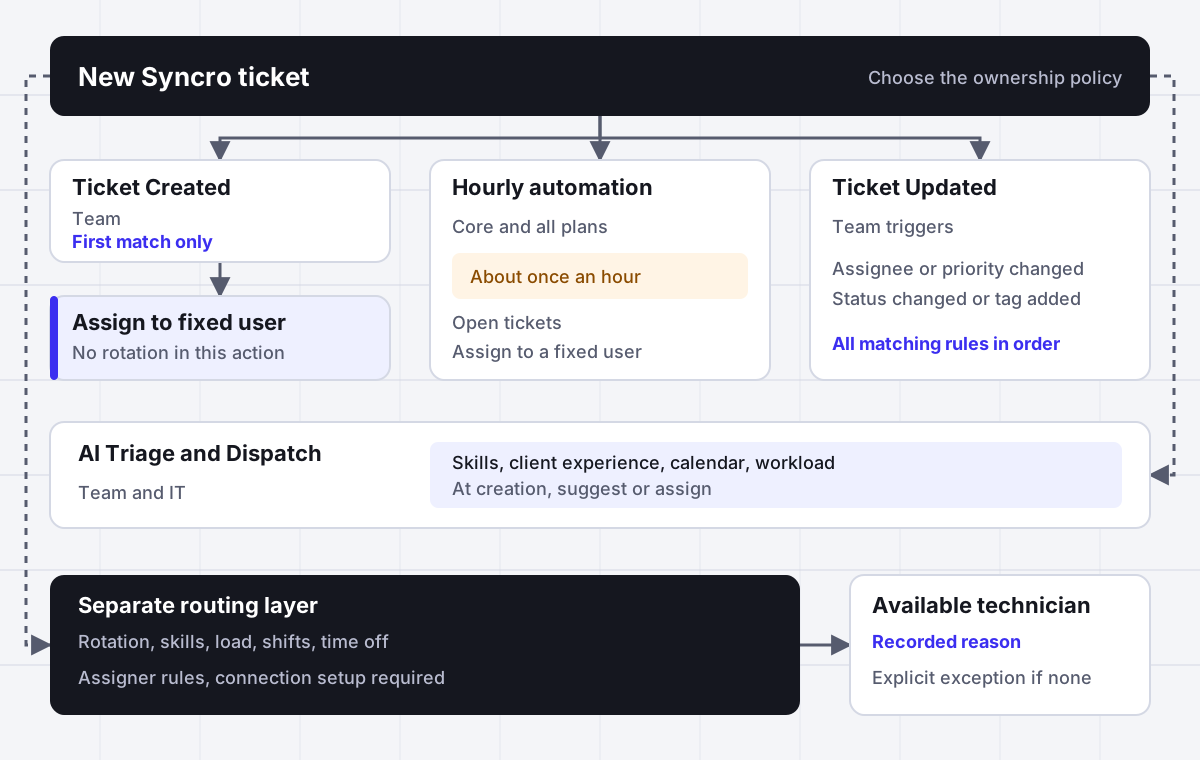
Syncro ticket automations run on Hourly, Ticket Updated or Ticket Created events, and the classic Assign to action selects one fixed Syncro User rather than rotating through available technicians. Hourly runs about once an hour on every plan, while Ticket Created and Ticket Updated require Team. Native Automated Triage and Dispatch on Team and IT plans can select a technician at creation using eligibility, skills, client experience, calendar availability and workload. Assigner offers a separate routing policy with deterministic rotation, shift schedules, time off and a recorded assignment reason.
Why it fits
For an MSP service manager or dispatcher using the Syncro ticketing system whose tickets wait for an hourly scan or collect on one fixed assignee, and who needs an available owner with a recorded reason.
A fixed user is a destination rather than a rotation
The classic Assign to action selects one Syncro User. Conditions can identify the customer, priority or ticket category, but the action does not compare available technicians. If every matching ticket reaches the same person, check that action before changing the conditions or looking for a hidden round robin setting.
Hourly checks leave a timing gap
Hourly automations check open tickets about once an hour, without a fixed execution time. They are available on every plan and suit periodic follow-up, but they are a poor dependency for initial ownership when the desk needs a technician at intake. Define assignment separately from maintenance of waiting tickets.
Ticket Created stops at the first match
Only one Ticket Created automation runs for each new ticket, including tickets from inbound email and the system tray. The first matching rule in saved order wins. Put specific intake policies before broad ones and make that matching rule complete enough to produce the intended result.
Ticket Updated follows a different execution model
All matching Ticket Updated rules run in saved order, subject to conditions still matching after earlier actions. Assignee, priority, status and tag changes can trigger them. That makes an ownership change part of a wider workflow, so review later actions before treating the first assignment as the final owner.
Native AI dispatch is a real option
Syncro Automated Triage and Dispatch can suggest or assign a technician at creation on Team and IT plans. It considers calendars and normalized high-priority workload alongside suitability. Evaluate it when that model fits, especially during the included AI period, and test the documented calendar differences against actual staffing.
Rules can explain the person decision
Assigner sits beside the PSA and uses rules you control for round robin, weighted rotation, load balancing, skills and live availability. Shift schedules and time off can define eligibility without an Outlook calendar. Each assignment records its reason, with plan selection determining which routing methods and audit tools are available.
Side by side
How each Syncro assignment approach chooses the technician
| Method | Plan or setup | When it runs | How it selects the owner | What to verify |
|---|---|---|---|---|
| Hourly automation with Assign to | Every Syncro plan | About once an hour across open tickets | One fixed Syncro User selected in the action | Variable scan timing, repeat limits and conditions changed by the action |
| Ticket Created automation with Assign to | Syncro Team | New ticket creation, including inbound email and system tray | The fixed user in the first matching rule in saved order | Specific rules precede broad matches, only one creation rule runs |
| Ticket Updated automation with Assign to | Syncro Team | Assignee, priority, status or ticket tag change | Fixed user actions in matching rules, evaluated in saved order | Earlier actions can prevent later matches, priority triggers require enabled priorities |
| AI dispatch in suggest mode | Syncro Team and IT, Admin > AI - Preferences | Ticket creation | Suggests a technician using eligibility, skills, client experience, availability and workload | Suggestions appear only in ticket views that include unassigned tickets |
| AI dispatch in assign mode | Syncro Team and IT, priorities enabled | Ticket creation | Assigns using the native dispatch inputs | Calendar limitations, technician inclusion, private note and change history |
| Assigner rule for rotation or skill matching | Assigner Starter or above, a connection must be configured | When the connected intake delivers the work | Eligible technician under rules using availability and capacity | Identity mapping, delivery timing, assignment writeback and exception ownership |
| Assigner load balancing or weighted rotation | Load balancing on Assigner Team, weighted rotation on Business | When work reaches the routing layer | Available technician under the chosen load or weighted rotation policy | Current workload inputs, shift schedule, time off and recorded reason |
Based on Syncro guides About Ticket Automation Types and When They Run, updated October 13, 2026, Ticket Automations Reference, Automated Ticket Triage and Dispatch, updated October 6, 2026, and pricing as of October 24, 2026. Assigner prices and feature availability follow the published site plans. Verify connection behavior for the configured workflow.
In detail
Build a Syncro ticket workflow with an available owner and a clear reason
Separate the event from the ownership decision
Start by identifying what wakes the rule up. Syncro has Hourly, Ticket Updated and Ticket Created automation types. Hourly is available on every plan. The other types require the Team Plan. These are execution choices, not interchangeable ways of distributing tickets among people.
An Hourly rule checks open work periodically. A Ticket Created rule handles new intake. A Ticket Updated rule responds to a supported change. If the complaint is that a new request has no owner, identify the intake path before adjusting a follow-up rule. Faster ownership requires an assignment decision that receives the work at the right point.
| Operational question | Decision to make |
|---|---|
| What event starts processing | Creation, a supported update or an hourly check |
| Which tickets belong in this policy | Conditions on maintained ticket and customer information |
| Who can take this ticket now | Fixed user, native AI dispatch or a separate routing policy |
Keep these decisions distinct in the desk procedure. Correct classification does not prove that the selected technician is working. Conversely, a sensible person selection policy cannot act before its intake receives the ticket. This separation gives the dispatcher a concrete place to investigate waiting work instead of changing unrelated rules together.
Understand what the classic Assign to action actually does
The action behind syncro assign ticket to technician searches is Assign to, which selects one Syncro User. Classic automations do not offer rotation, round robin, load comparison or availability as alternatives in that action.
The condition list is broader than the person selection. It includes Customer, Customer Tags, Contact Tags, Assigned to, Assigned SLA, Has SLA, Ticket Type, Ticket Issue Type, Ticket Priority, Ticket Status and Ticket Tags. Those criteria describe the work and its current state. They do not turn the fixed destination into a staffing decision.
Use fixed ownership when it represents the real policy
The problem appears when the name is being used as a substitute for whoever is available. Document that distinction before replacing a working client policy.
Business Hours conditions support only during or only outside business hours. That helps separate service windows, but it does not compare individual technician shifts inside Assign to. Likewise, matching an existing assignee is a ticket condition rather than a workload calculation. If your policy requires an available technician from a pool, choose a mechanism that actually selects from a pool and document how eligibility is maintained.
Put specific Ticket Created rules before broad matches
Only one Ticket Created automation runs per ticket. Syncro evaluates the saved order and runs the first matching rule. This applies to new tickets, including tickets arriving through inbound email and the system tray. A broad match near the top can consume the ticket before a client-specific rule has a chance to run.
Review the whole creation list when an expected rule appears inactive. Read the conditions of earlier rules against the same ticket.
Make the winning rule complete
Do not design a creation workflow that needs several matching Ticket Created rules to contribute separate outcomes. Put the required supported actions into the rule that should win, and check the resulting ticket state. Conditions and actions can classify work, set an SLA, change priority or status, add tags and assign a fixed user, but later creation rules will not fill gaps.
Keep the interaction with Ticket Updated separate. A Ticket Created action can trigger a Ticket Updated automation. That is a supported transition between types, rather than evidence that multiple creation rules ran. When the final assignee differs from the one in the winning creation rule, inspect the subsequent update workflow before concluding that saved creation order was ignored.
Use Hourly automations for periodic work with repeat controls
Hourly processing checks all open tickets about once an hour, not at a fixed time. A dispatcher should not promise that a ticket arriving just before a particular clock time will be processed immediately afterward. The documented schedule is approximate. Waiting for that scan is a workflow dependency that needs to be visible when initial assignment matters.
An Hourly rule runs up to 10 times per ticket. If it has a public comment, private comment or SMS action, the cap is 5. The Run Once checkbox limits execution to one run. These controls limit repetition; they do not provide a faster initial assignment event.
Make actions remove the reason for another run
To prevent repeat execution, actions must change the conditions. For a rule using Not updated in hours, the Update Ticket action timestamps Last Updated and can stop re-triggering on that condition. Adding an unrelated action while leaving the original match true is not an equivalent control.
Review repeat behavior alongside notifications and ownership. An hourly rule with a fixed Assign to action can interfere with an ownership policy if it continues to match tickets after their intended assignment. State which open tickets should still qualify and which state change ends that qualification. Most automations do not run on Resolved tickets, so do not use the periodic path as an assumed way to process every resolved record.
Trace Ticket Updated rules in saved order
Ticket Updated supports Assignee Changed, including unassigned to assigned, Priority Changed, Ticket Status Changed and Ticket Tag Added. Priority Changed requires priorities enabled in Ticket Settings. All matching rules run in saved order, but a preceding action can change the ticket so it no longer matches the next rule.
This differs from the first-match-only creation model. When a new owner is followed by another assignment, inspect every matching update rule and the state left by earlier actions. A condition that matched the original event may no longer match later in the sequence.
Loop prevention also has a defined boundary. Hourly and Ticket Created actions can trigger Ticket Updated automations. Ticket Updated automations cannot trigger other Ticket Updated automations. Do not build an update workflow that depends on an unlimited chain of changes firing more update rules.
Treat bulk changes as a separate processing path
Bulk edits can trigger update automations, evaluated as Status, Priority, Tech (Assignee), then Add New Tags. Processing can take up to 10 minutes. Uncheck Run Ticket Update Automations in Bulk Edit when the deliberate choice is to skip them. During testing, allow for that documented processing window before repeating an edit. Most automations skip Resolved tickets, but Ticket Status Changed supports Resolved, a useful distinction when tracing a closing workflow.
Keep ticket tags and ticket blueprints in their proper roles
Syncro ticket tags can describe routing information, and Ticket Tag Added is a supported update trigger. The reference also lists Ticket Tags and New ticket tag added among conditions, with Add Ticket Tag and Remove Ticket Tag among actions. These let a desk express a maintained classification policy without pretending the tag itself chooses an available person.
Choose tag meanings the team can maintain consistently. If a tag identifies a skill requirement, make that a documented input to the person selection policy. If another rule adds or removes it, review how the changed state affects later matching rules.
Syncro offers ticket blueprints as reusable ticket templates. That is the relevant distinction for assignment planning. A reusable template and a decision about which technician is working now solve different operational needs. Do not assume that using a blueprint supplies rotation, workload comparison or availability checks.
Subject matching deserves similar care. Ticket Subject is and is not conditions are case sensitive, while contains is not case sensitive. Test the actual wording arriving in tickets before relying on a subject condition to select a policy. Well-maintained classification makes routing inputs useful, but the owner still needs a separate, explicit selection decision.
Evaluate native Automated Triage and Dispatch on its merits
Syncro Automated Triage and Dispatch is a native option on Team and IT plans. At ticket creation, AI can set priority, technician or both. Triage and Dispatch each support disabled, suggest or assign. New accounts default to suggest, and setup is under Admin > AI - Preferences. Ticket priorities must be enabled.
The technician decision considers eligibility, skill scores, client experience, calendar availability and workload. Workload uses high-priority ticket count normalized across eligible candidates. That gives the native approach substantially more context than the classic Assign to action. A comparison that says Syncro can only assign a fixed person would overlook this separate capability.
Use suggestions to review fit before automatic assignment
Suggest mode is useful when the dispatcher wants to inspect recommendations. Suggestions appear only in ticket views that include unassigned tickets, so choose an appropriate view before interpreting an absent suggestion. In assign mode, automatic assignments add a private note and are recorded in change history.
Native dispatch is a sensible choice when the team wants a model using those inputs and the calendar behavior fits staffing. AI features are included at no extra cost through January 2027, then move to usage-based AI credits with a monthly included pool per technician. Evaluate the native option during that period. A written rotation rule offers a different policy, not proof that a model using workload and calendars cannot serve the desk well.
Test calendar coverage and the limits of native dispatch
Out of Office on an integrated Outlook or Google calendar excludes a technician from native dispatch. The documented calendar capabilities differ, however. Outlook availability includes a working-hours check, with 75 percent booked treated as unavailable. Google Calendar supports only out-of-office exclusion. A busy Google calendar is therefore not documented as equivalent to the Outlook availability calculation.
Technicians without an integrated calendar use the last pre-computed availability state. The user setting Include in ticket dispatch is checked by default. Review inclusion and the actual availability source together, especially when staffing contains technicians with different calendar setups.
Skill matrices are built from up to 100 resolved tickets from the past three months and can take up to 24 hours. When evaluating a technician recommendation, distinguish a staffing issue from the history available to the model and allow for the documented preparation time.
Define the empty candidate procedure yourself
The native dispatch documentation does not state what happens when no candidate qualifies. Do not assume an undocumented fallback or promise that every ticket will receive an owner in that situation. Assign a dispatcher responsibility for exceptions and test the relevant case in the intended workflow. The same operational question belongs in any routing project, regardless of which selection engine the desk chooses.
Choose Assigner when the desk needs rules it can explain
Assigner is a routing layer beside the PSA. It chooses an owner using round robin, weighted rotation, load balancing, skills and live availability, with the available methods depending on the plan. The rules stay under your control, and every assignment records why the technician was selected. AI assists the process rather than taking ownership of the policy.
Start with eligibility. Shift schedules and time off define who is working, without requiring an Outlook calendar as the availability source. Skill requirements narrow the pool further. Capacity caps prevent a technically available person from remaining eligible beyond the limit you set. Then the selected distribution rule chooses among the suitable candidates.
- Round robin gives eligible technicians turns under a deterministic rotation policy.
- Weighted rotation changes the share assigned under your written policy.
- Load balancing uses current work when spare capacity should determine ownership.
- A recorded reason makes the selected rule understandable after assignment.
This is useful when a dispatcher needs to explain the policy to technicians as well as administer it. Compare availability routing with the native calendar model and round robin ticket assignment with the distribution policy the team actually wants.
Make the connection and assignment ownership explicit
A separate routing decision needs a verified path from intake to the final ticket owner. Treat the connection as configuration work. Assigner has generic intake options, but this page does not present a dedicated native Syncro connector or a ready-made two-way sync. Confirm which delivery and writeback methods the proposed workflow can support before promising automatic assignment inside Syncro.
For a connected design, identify the incoming ticket, map the technician identities, deliver the maintained routing inputs and return the chosen owner through a supported writeback path. Check that the recorded reason remains accessible to the dispatcher. These are acceptance criteria for the connection, not a claim that classic Syncro automations provide an undocumented action.
Choose which component owns the person field
Keep Syncro conditions and actions that express useful service policy. Review any fixed Assign to action that could compete with the routing decision. Creation, hourly maintenance and supported update events can affect the ownership workflow at different points, so test their combined result rather than validating the routing layer in isolation.
Native AI dispatch already records automatic assignments with a private note and change history. Assigner records a reason under its own policy, with the audit log feature on Business. Decide which evidence the desk needs and where it will read it. A current assignee alone does not explain whether a native action, a model recommendation or the configured routing rule selected that person.
Compare the plan change with the routing policy you need
As of October 24, 2026, Syncro Core is $129 per technician per month billed annually, or $159 billed monthly. Team is $179 billed annually, or $209 billed monthly. Real-Time Ticket Automations and Automated Triage and Dispatch are Team features. The published Core to Team gap is $50 per technician per month on either billing schedule.
For a Core team, compare that upgrade with the whole set of Team features the desk would use. If the reason for considering Team is person selection alone, a separate rules layer deserves evaluation. Include connection work and ongoing administration in that comparison. A lower routing subscription by itself does not establish the total cost of the finished workflow.
Assigner prices are per user per month. Starter is $7 billed yearly or $15 billed monthly. Team is $18 billed yearly or $36 billed monthly. Business is $36 billed yearly or $72 billed monthly. Enterprise is $49 billed yearly or $98 billed monthly. Plans have a 5 user minimum.
Starter includes round robin, skill-based assignment, capacity caps and availability skip. Load-balanced and priority routing start on Team. Business adds weighted round robin, multiple teams and queues, and the audit log of every assignment. Choose against the required policy, then compare Assigner plans. Syncro AI usage after the included period is another budget input, with no invented credit-cost estimate.
Validate the workflow with tickets the dispatcher recognizes
Review a small set of representative situations before depending on the finished workflow. Use the ticket types and staffing patterns the desk actually handles. The purpose is to confirm ownership and its explanation, not to demonstrate an ideal path with every technician available and every rule matching cleanly.
- Check creation order. Use an intake case matching both a specific policy and a broad creation rule. Confirm that the intended first match supplies the required outcomes.
- Check the fixed destination. Identify every Assign to action that can affect that ticket and decide whether the fixed owner is deliberate.
- Check staffing boundaries. Review an off-shift technician, time off, a capacity limit and any required skill under the chosen routing policy.
- Check native dispatch inputs. If using AI dispatch, review inclusion, calendar type, availability state and skill history.
- Check subsequent changes. Trace matching update rules and allow for the documented bulk processing window.
- Check exceptions and evidence. Verify the owner writeback, the recorded reason and the desk procedure when nobody qualifies.
Measure the workflow against the requirement that caused the project. A ticket should reach an available owner under an agreed policy, and the dispatcher should be able to explain that assignment. When it cannot be assigned, the exception needs visible responsibility. That is a more useful acceptance standard than merely confirming that an automation ran.
Questions buyers ask
Frequently asked questions
How do syncro ticket automations assign a ticket to a technician?
Classic Syncro ticket automations assign a ticket through Assign to, which selects one fixed Syncro User. The action does not rotate through technicians or compare availability and workload. Choose the correct automation type and matching conditions, then evaluate native AI dispatch or a separate routing policy when the person must be selected dynamically.
Which automations are available in the syncro ticketing system?
The Syncro ticketing system offers Hourly, Ticket Updated and Ticket Created automations. Hourly is available on every plan, while the other types require Team. Hourly checks open tickets about once an hour without a fixed time. Creation and update rules use different execution models, so saved order needs review for each type.
Does syncro round robin work through the classic Assign to action?
No, classic Syncro Assign to selects one fixed user and has no round robin, workload or availability option. Native AI dispatch is a separate technician selection feature rather than a documented deterministic rotation. Assigner provides a rules layer with round robin and availability checks when that is the policy your desk needs.
What are syncro ticket blueprints?
Syncro ticket blueprints are reusable ticket templates. A template and a decision about who is available to own a ticket serve different purposes. For technician assignment, review the applicable automation action or dispatch policy separately, and do not assume that a blueprint provides rotation, workload comparison or a staffing availability check.
How can syncro ticket tags help with routing?
Syncro ticket tags can supply routing conditions, and adding a ticket tag can trigger a Ticket Updated automation. Rules can also add or remove tags. Define what each routing tag means and review saved update rule order, because an earlier action can change whether a later rule still matches the ticket.
How does syncro automated triage and dispatch choose a technician?
Syncro Automated Triage and Dispatch considers eligibility, skill scores, client experience, calendar availability and normalized high-priority workload at ticket creation. It is available on Team and IT plans, with disabled, suggest or assign settings. Priorities must be enabled, and automatic assignments add a private note and appear in change history.
Why do Hourly automations leave Syncro tickets waiting?
Hourly automations check all open tickets about once an hour, without a fixed execution time. They are periodic processing rather than an immediate creation trigger. If initial ownership depends on that scan, the workflow inherits its timing. Review Team creation automation, native dispatch or a configured routing intake for earlier assignment.
Why does only one Ticket Created automation run?
Only the first matching Ticket Created automation runs for each new Syncro ticket, using saved rule order. A broad earlier rule can prevent a later specific rule from executing. Put specific policies before broad matches and include the required supported outcomes in the rule that is intended to handle that intake.
Can Ticket Updated automations trigger other update automations?
No, Ticket Updated automations cannot trigger other Ticket Updated automations. Hourly and Ticket Created actions can trigger Ticket Updated processing. Within an update event, all matching rules are evaluated in saved order, but an earlier action can make the ticket stop matching a later rule before that rule would run.
Does native Syncro dispatch treat Outlook and Google calendars alike?
No, the documented calendar availability behavior differs. Outlook includes a working-hours check and treats 75 percent booked as unavailable. Google Calendar supports out-of-office exclusion only. Out of Office excludes a technician on either provider, while technicians without an integrated calendar use their last pre-computed availability state for the native dispatch decision.
What does Syncro Team cost compared with Core for dispatch?
Syncro Team costs $179 per technician per month billed annually or $209 billed monthly, compared with Core at $129 or $159. The upgrade gap is $50 per technician per month. Team includes real-time automations and native dispatch, with AI included through January 2027 before usage-based credits with a monthly included pool.
What does Assigner add beside Syncro ticketing?
Assigner adds person selection through rules using rotation, skills, workload and live availability, with a reason recorded on every assignment. Shift schedules and time off can define availability without Outlook calendars. Starter is $7 per user per month billed yearly or $15 billed monthly. A Syncro connection requires a verified intake and writeback design.
Keep reading
More on MSP ticket assignment, routing rules and dispatch costs
- MSP ticket assignment - Define client routing and available technician ownership across a managed services desk.
- HaloPSA ticket rules - Compare ticket rules, native rotation and the eligibility behind the person decision.
- Atera ticket automation rules - Review creation rule order, technician groups and the limits of equal turns.
- Autotask auto assign tickets - Understand workflow-based assignment and where technician selection needs more context.
- ConnectWise auto assign tickets - Review service ticket assignment and the decisions a dispatcher still needs to own.
- Round robin ticket assignment - Choose rotation rules with availability checks and an explicit capacity policy.
- Syncro pricing per technician - Compare Core at $129 with Team at $179 per technician per month billed annually, the $50 upgrade gap and what dispatch costs after included AI usage ends.
Stop hand-sorting your incoming work
Let Assigner route it to the right available person by skill, workload, and availability, using rules you control. Nothing sits unassigned and no one gets cherry-picked. Every assignment shows why.